Windows Leistung erhöhen + Oberflächen Styling

l Startseite

l Impressum

l This page in english

Windows Tweaks Infos

Microsoft Zukunft und Infos

Tests und Workshops

Tipps & Tricks Artikel

Win 98 l Win 2000 l Win Me

VWindows, Betriebssystem, Tipps, Tricks, Software, Tweak, Hardware, PC, Ghz,  Download, Windows 98, Windows Me, Windows 2000, Windows XP, Windows Longhorn, Windows Server 2003, 98, 95, XP, Whistler, ME, 9x, Windows Millennium, NT, Win, Downloads, Update, WU, Fehler, Troubleshooting, Probleme, Bugfix, Hilfe, FAQ, Anleitungen, Tests, Testberichte, Office, DirectX, Tips, Tricks, Hilfe, Help, Deutsch, Chat, Support, Forum, Defragmentierung, Systemtuning, Beschleunigen,

Windows XP

Windows Vista

Windows Leistung erhöhen + Styling mit Themes und Skins

Windows Tweaks Interaktiv

Forum

Windows Tweaks Infos

Weitere Rubriken

Windows Links

Windows, Betriebssystem, Tipps, Tricks, Software, Tweak, Hardware, PC, Ghz,  Download, Windows 98, Windows Me, Windows 2000, Windows XP, Windows Longhorn, Windows Server 2003, 98, 95, XP, Whistler, ME, 9x, Windows Millennium, NT, Win, Downloads, Update, WU, Fehler, Troubleshooting, Probleme, Bugfix, Hilfe, FAQ, Anleitungen, Tests, Testberichte, Office, DirectX, Tips, Tricks, Hilfe, Help, Deutsch, Chat, Support, Forum, Defragmentierung, Systemtuning, Beschleunigen,


Windows, Betriebssystem, Tipps, Tricks, Software, Tweak, Hardware, PC, Ghz,  Download, Windows 98, Windows Me, Windows 2000, Windows XP, Windows Longhorn, Windows Server 2003, 98, 95, XP, Whistler, ME, 9x, Windows Millennium, NT, Win, Downloads, Update, WU, Fehler, Troubleshooting, Probleme, Bugfix, Hilfe, FAQ, Anleitungen, Tests, Testberichte, Office, DirectX, Tips, Tricks, Hilfe, Help, Deutsch, Chat, Support, Forum, Defragmentierung, Systemtuning, Beschleunigen,

.: Windows Tweaks Partner

computerwissen.de

tweakpc.de

netzwerktotal.de

w-tweaks.com

dexpot.de

pcmweb.nl

giza-blog.de

windowszone.de

meinskype.de

virenschutz.info

codezone.de

demonews.de

treiber-könig.de

magictweak.com

3dchip.de

Vista-Blog.de

winforpro.com

toolster.de

Windows, Betriebssystem, Tipps, Tricks, Software, Tweak, Hardware, PC, Ghz,  Download, Windows 98, Windows Me, Windows 2000, Windows XP, Windows Longhorn, Windows Server 2003, 98, 95, XP, Whistler, ME, 9x, Windows Millennium, NT, Win, Downloads, Update, WU, Fehler, Troubleshooting, Probleme, Bugfix, Hilfe, FAQ, Anleitungen, Tests, Testberichte, Office, DirectX, Tips, Tricks, Hilfe, Help, Deutsch, Chat, Support, Forum, Defragmentierung, Systemtuning, Beschleunigen,


Windows, Betriebssystem, Tipps, Tricks, Software, Tweak, Hardware, PC, Ghz,  Download, Windows 98, Windows Me, Windows 2000, Windows XP, Windows Longhorn, Windows Server 2003, 98, 95, XP, Whistler, ME, 9x, Windows Millennium, NT, Win, Downloads, Update, WU, Fehler, Troubleshooting, Probleme, Bugfix, Hilfe, FAQ, Anleitungen, Tests, Testberichte, Office, DirectX, Tips, Tricks, Hilfe, Help, Deutsch, Chat, Support, Forum, Defragmentierung, Systemtuning, Beschleunigen,


Windows, Betriebssystem, Tipps, Tricks, Software, Tweak, Hardware, PC, Ghz,  Download, Windows 98, Windows Me, Windows 2000, Windows XP, Windows Longhorn, Windows Server 2003, 98, 95, XP, Whistler, ME, 9x, Windows Millennium, NT, Win, Downloads, Update, WU, Fehler, Troubleshooting, Probleme, Bugfix, Hilfe, FAQ, Anleitungen, Tests, Testberichte, Office, DirectX, Tips, Tricks, Hilfe, Help, Deutsch, Chat, Support, Forum, Defragmentierung, Systemtuning, Beschleunigen,

Transformation to Vista >> Completely replace your Windows desktop with a Talisman Vista shell

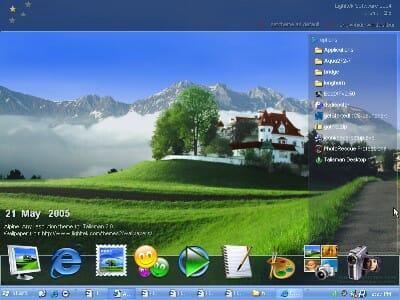
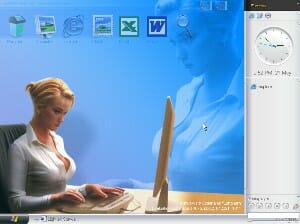
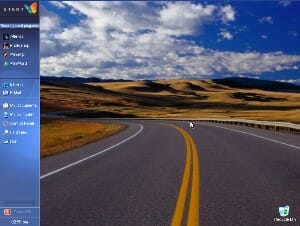
The explorer.exe is the so-called Shell of Windows: It is responsible for the display of the task bar, the start menu, the windows and much more. The alternative shell from Lighttek, called Talisman Desktop, replaces explorer.exe completely and offers completely new user experience:

           
              Talisman completely readjusts your Windows Shell

1. To change your shell, simply download Talisman Desktop, install and start it. Immediately after the first start you will see a completely new interface - which isnt pretty pretty at first. A quick replacement can be found over at Lighttek Themes. But we want the Vista thing so we have already picked most of the Vista themes currently available for Talisman:


Title: Longhorn 4051
Size: 428 KB
Download!

Title: Longhorn 4074
Size: 652 KB
Download!

Title: Bridge
Size: 573 KB
Download!

Title: Longhorn 4029
Size: 198 KB
Download!

Title: Longhorn 4075
Size: 642 KB
Download!

Title: WindowsNET Longhorn
Size: 399 KB
Download!

2. Download your favorite theme and extract it into the X:\Program Files\Talisman 2\themes (or wherever you have installed Talisman 2):


3. In Talisman, right-click on the interface and select Themes/Name of theme. The total outfit of Windows changes instantly. Now, give yourself time and explorer the new user interface and new possibilities...

4. For instance, try moving an object and right-click on it to edit its properties. You can now change several aspects like the objects graphic, text, function, size or how it reacts when you (e.g.) hover your mouse over it.
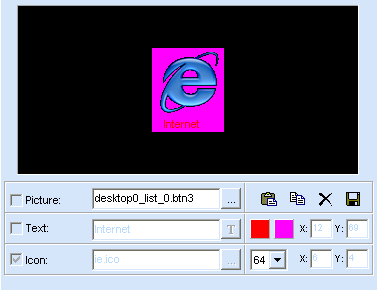
            

5. To create a new object, for instance a button, right-click on the Talisman interface and select New/Button. Right-click on this new button, select Properties and change every aspect that you like. In our example, we created a button that starts Windows Media Player. And this is what we had to adjust:

Text: Windows Media Player 10
Color: White
Shadow: Black
Icon: c:\program files\windows media player\wmplayer.exe
Icon Size: 32
Icon position: 0/-35
Command: C:\Program Files\Windows Media Player\wmplayer.exe

As you see for yourself, there are many more options to discover...for example, you can not only create shortcuts but also objects like calendars or lists. The possibilities are endless!

6. To exit Talisman, simply right-click on the interface and select Quit.

< Previous Page

Back to Vista Transformation

Next Page >