Windows Leistung erhöhen + Oberflächen Styling

l Startseite

l Impressum

l This page in english

Windows Tweaks Infos

Microsoft Zukunft und Infos

Tests und Workshops

Tipps & Tricks Artikel

Win 98 l Win 2000 l Win Me

VWindows, Betriebssystem, Tipps, Tricks, Software, Tweak, Hardware, PC, Ghz,  Download, Windows 98, Windows Me, Windows 2000, Windows XP, Windows Longhorn, Windows Server 2003, 98, 95, XP, Whistler, ME, 9x, Windows Millennium, NT, Win, Downloads, Update, WU, Fehler, Troubleshooting, Probleme, Bugfix, Hilfe, FAQ, Anleitungen, Tests, Testberichte, Office, DirectX, Tips, Tricks, Hilfe, Help, Deutsch, Chat, Support, Forum, Defragmentierung, Systemtuning, Beschleunigen,

Windows XP

Windows Vista

Windows Leistung erhöhen + Styling mit Themes und Skins

Windows Tweaks Interaktiv

Forum

Windows Tweaks Infos

Weitere Rubriken

Windows Links

Windows, Betriebssystem, Tipps, Tricks, Software, Tweak, Hardware, PC, Ghz,  Download, Windows 98, Windows Me, Windows 2000, Windows XP, Windows Longhorn, Windows Server 2003, 98, 95, XP, Whistler, ME, 9x, Windows Millennium, NT, Win, Downloads, Update, WU, Fehler, Troubleshooting, Probleme, Bugfix, Hilfe, FAQ, Anleitungen, Tests, Testberichte, Office, DirectX, Tips, Tricks, Hilfe, Help, Deutsch, Chat, Support, Forum, Defragmentierung, Systemtuning, Beschleunigen,


Windows, Betriebssystem, Tipps, Tricks, Software, Tweak, Hardware, PC, Ghz,  Download, Windows 98, Windows Me, Windows 2000, Windows XP, Windows Longhorn, Windows Server 2003, 98, 95, XP, Whistler, ME, 9x, Windows Millennium, NT, Win, Downloads, Update, WU, Fehler, Troubleshooting, Probleme, Bugfix, Hilfe, FAQ, Anleitungen, Tests, Testberichte, Office, DirectX, Tips, Tricks, Hilfe, Help, Deutsch, Chat, Support, Forum, Defragmentierung, Systemtuning, Beschleunigen,

.: Windows Tweaks Partner

computerwissen.de

tweakpc.de

netzwerktotal.de

w-tweaks.com

dexpot.de

pcmweb.nl

giza-blog.de

windowszone.de

meinskype.de

virenschutz.info

codezone.de

demonews.de

treiber-könig.de

magictweak.com

3dchip.de

Vista-Blog.de

winforpro.com

toolster.de

Windows, Betriebssystem, Tipps, Tricks, Software, Tweak, Hardware, PC, Ghz,  Download, Windows 98, Windows Me, Windows 2000, Windows XP, Windows Longhorn, Windows Server 2003, 98, 95, XP, Whistler, ME, 9x, Windows Millennium, NT, Win, Downloads, Update, WU, Fehler, Troubleshooting, Probleme, Bugfix, Hilfe, FAQ, Anleitungen, Tests, Testberichte, Office, DirectX, Tips, Tricks, Hilfe, Help, Deutsch, Chat, Support, Forum, Defragmentierung, Systemtuning, Beschleunigen,


Windows, Betriebssystem, Tipps, Tricks, Software, Tweak, Hardware, PC, Ghz,  Download, Windows 98, Windows Me, Windows 2000, Windows XP, Windows Longhorn, Windows Server 2003, 98, 95, XP, Whistler, ME, 9x, Windows Millennium, NT, Win, Downloads, Update, WU, Fehler, Troubleshooting, Probleme, Bugfix, Hilfe, FAQ, Anleitungen, Tests, Testberichte, Office, DirectX, Tips, Tricks, Hilfe, Help, Deutsch, Chat, Support, Forum, Defragmentierung, Systemtuning, Beschleunigen,


Windows, Betriebssystem, Tipps, Tricks, Software, Tweak, Hardware, PC, Ghz,  Download, Windows 98, Windows Me, Windows 2000, Windows XP, Windows Longhorn, Windows Server 2003, 98, 95, XP, Whistler, ME, 9x, Windows Millennium, NT, Win, Downloads, Update, WU, Fehler, Troubleshooting, Probleme, Bugfix, Hilfe, FAQ, Anleitungen, Tests, Testberichte, Office, DirectX, Tips, Tricks, Hilfe, Help, Deutsch, Chat, Support, Forum, Defragmentierung, Systemtuning, Beschleunigen,

Transformation to Vista >> Use the Vista 3D Desktop today!

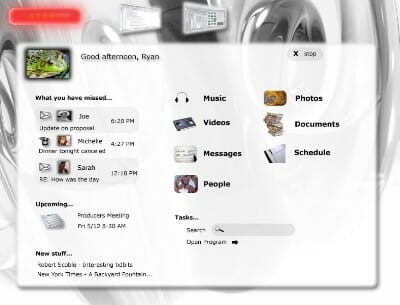
Microsoft indicated early that Vista will feature a three-dimensional interface with transparency, moving objects, anti-aliasing and other effects. It is unclear whether the whole Windows interface will play in the third dimension or whether it is just limited to a few useful effects.   


 Only 3D-effects or a total new three-dimensional user interface: This Vistablogs.com screenshot indicates the latter

Although there is no way to integrate those nice special effects you can have the three-dimensionality today! And its as simple as this:

1. Download SphereXP and install this small tool.

Note: The Microsoft .NET Framework 1.1 must be installed. You can download it here!

2. Start SphereXP.
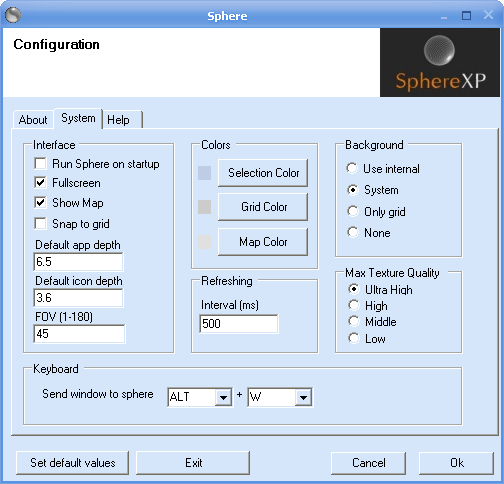
        

3. We recommend leaving most of the settings. But if you prefer, you can select your System background instead of the new mountain wallpaper that is specifically designed for SphereXP. Furthermore we recommend setting the Max Texture Quality to high which is suitable for most computers beyond the 1 Ghz barrier. Hit OK and wait until your desktop becomes three-dimensional!
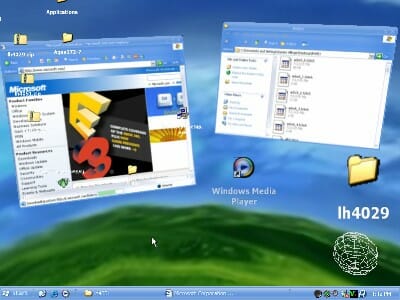
            

4. You can go back to the properties by right-clicking on the 3D-interface and selecting Properties. A right-click and Exit brings you back to the normal Windows Desktop. Now, lets fly a few rounds in our new 3D-world: Press the third mouse button (middle) and move your mouse. You will find yourself in a real Sphere. Right-click, select Move and move the mouse up and down to scroll back and forward. Select an icon, right-click on it and select Move. Do just the same to position the icon in the fore- or background of your 3D-interface.

To send a normal Window to the sphere make sure its selected and hit STRG+W (default setting) to make it three-dimensional. These are the basics with SphereXP! We hope you enjoyed your first 3D-ride - we agree, its somewhat confusing for the first minutes but with a little practise you are able to work very efficient with this new kind of look & feel.

< Previous Page

Back to Vista Transformation

Next Page >