1. Right-click My Computer and click Properties. Now, switch to Advanced and hit the Environment Variables button. You will see the System Variables section in which you click on New. 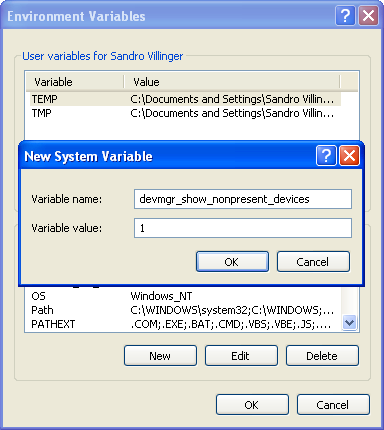 2. A new dialog box prompts you to enter Variable name (Type: devmgr_show_nonpresent_devices; without quotation marks) and the Variable Value (Type: 1). Confirm your input with OK (twice) and click the Hardware tab (remember that the window System Properties must still be open). There you will find the button Device Manager. After hitting it the following screen appears... 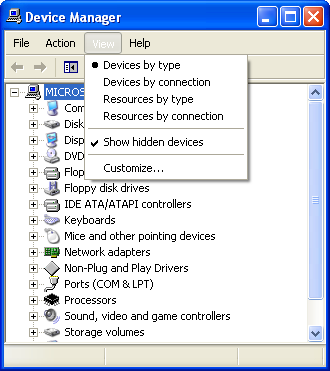 3. Now click on the menu item View and select Show hidden devices (to activate this option the checkmark must be visible). This will make all currently non-attached (non-present) device drivers visible. You can continue with expanding the different device trees, e.g. Storage volumes, and looking for entries with a translucent icon:  4. Right-click on those entries and select Uninstall. After clicking OK, thus applying the deletion, you will probably be prompted to restart your machine! After you have carried out this order your machine will be free from those performance-stealing drivers. |