Windows Leistung erhöhen + Oberflächen Styling

l Startseite

l Impressum

l This page in english

Windows Tweaks Infos

Microsoft Zukunft und Infos

Tests und Workshops

Tipps & Tricks Artikel

Win 98 l Win 2000 l Win Me

VWindows, Betriebssystem, Tipps, Tricks, Software, Tweak, Hardware, PC, Ghz,  Download, Windows 98, Windows Me, Windows 2000, Windows XP, Windows Longhorn, Windows Server 2003, 98, 95, XP, Whistler, ME, 9x, Windows Millennium, NT, Win, Downloads, Update, WU, Fehler, Troubleshooting, Probleme, Bugfix, Hilfe, FAQ, Anleitungen, Tests, Testberichte, Office, DirectX, Tips, Tricks, Hilfe, Help, Deutsch, Chat, Support, Forum, Defragmentierung, Systemtuning, Beschleunigen,

Windows XP

Windows Vista

Windows Leistung erhöhen + Styling mit Themes und Skins

Windows Tweaks Interaktiv

Forum

Windows Tweaks Infos

Weitere Rubriken

Windows Links

Windows, Betriebssystem, Tipps, Tricks, Software, Tweak, Hardware, PC, Ghz,  Download, Windows 98, Windows Me, Windows 2000, Windows XP, Windows Longhorn, Windows Server 2003, 98, 95, XP, Whistler, ME, 9x, Windows Millennium, NT, Win, Downloads, Update, WU, Fehler, Troubleshooting, Probleme, Bugfix, Hilfe, FAQ, Anleitungen, Tests, Testberichte, Office, DirectX, Tips, Tricks, Hilfe, Help, Deutsch, Chat, Support, Forum, Defragmentierung, Systemtuning, Beschleunigen,


Windows, Betriebssystem, Tipps, Tricks, Software, Tweak, Hardware, PC, Ghz,  Download, Windows 98, Windows Me, Windows 2000, Windows XP, Windows Longhorn, Windows Server 2003, 98, 95, XP, Whistler, ME, 9x, Windows Millennium, NT, Win, Downloads, Update, WU, Fehler, Troubleshooting, Probleme, Bugfix, Hilfe, FAQ, Anleitungen, Tests, Testberichte, Office, DirectX, Tips, Tricks, Hilfe, Help, Deutsch, Chat, Support, Forum, Defragmentierung, Systemtuning, Beschleunigen,

.: Windows Tweaks Partner

computerwissen.de

tweakpc.de

netzwerktotal.de

w-tweaks.com

dexpot.de

pcmweb.nl

giza-blog.de

windowszone.de

meinskype.de

virenschutz.info

codezone.de

demonews.de

treiber-könig.de

magictweak.com

3dchip.de

Vista-Blog.de

winforpro.com

toolster.de

Windows, Betriebssystem, Tipps, Tricks, Software, Tweak, Hardware, PC, Ghz,  Download, Windows 98, Windows Me, Windows 2000, Windows XP, Windows Longhorn, Windows Server 2003, 98, 95, XP, Whistler, ME, 9x, Windows Millennium, NT, Win, Downloads, Update, WU, Fehler, Troubleshooting, Probleme, Bugfix, Hilfe, FAQ, Anleitungen, Tests, Testberichte, Office, DirectX, Tips, Tricks, Hilfe, Help, Deutsch, Chat, Support, Forum, Defragmentierung, Systemtuning, Beschleunigen,


Windows, Betriebssystem, Tipps, Tricks, Software, Tweak, Hardware, PC, Ghz,  Download, Windows 98, Windows Me, Windows 2000, Windows XP, Windows Longhorn, Windows Server 2003, 98, 95, XP, Whistler, ME, 9x, Windows Millennium, NT, Win, Downloads, Update, WU, Fehler, Troubleshooting, Probleme, Bugfix, Hilfe, FAQ, Anleitungen, Tests, Testberichte, Office, DirectX, Tips, Tricks, Hilfe, Help, Deutsch, Chat, Support, Forum, Defragmentierung, Systemtuning, Beschleunigen,


Windows, Betriebssystem, Tipps, Tricks, Software, Tweak, Hardware, PC, Ghz,  Download, Windows 98, Windows Me, Windows 2000, Windows XP, Windows Longhorn, Windows Server 2003, 98, 95, XP, Whistler, ME, 9x, Windows Millennium, NT, Win, Downloads, Update, WU, Fehler, Troubleshooting, Probleme, Bugfix, Hilfe, FAQ, Anleitungen, Tests, Testberichte, Office, DirectX, Tips, Tricks, Hilfe, Help, Deutsch, Chat, Support, Forum, Defragmentierung, Systemtuning, Beschleunigen,

Transformation to Vista >> Enhance Security with password encrypted folders and files

Windows security fails when it comes to communicating between two or a group of users who want to keep their data secret. Although the Encryption File System (EFS) of Windows XP is advances, it does not allow (e.g.) passwords for files, encrypted archives or several encryption algorithms. With the free tool FineCrypt you can enhance your Windows security: The simple yet intuitive graphical user interface (GUI) lets you choose from 10 encryption algorithms and simultaneously compresses files and folders during this operation. You can benefit from a password protection and FineCrypts ability to integrate easily into your Windows shell.


Installing and using FineCrypt

1. Open www.finecrypt.net and download the totally free tool FineCrypt (approx. 4 MB). Then double-click on fcinst.exe and hit Continue. The installation wizard will load up and ask you to confirm the setup of FineCrypt as well as the installation path. Open up FineCrypt to view this plain tutorial.


2. After the wizard has explained all the details to you the actual GUI loads and lets you add common folders where your encrypted files are located. Lets see if the advices from the wizard helped you: Right-click on one or more files/folders that you want to encrypt and select Fine Crypt/Encrypt with password. A dialog box asks you to enter a passphrase. Remember, the more complex (more precisely: passwords with numbers, alphanumeric characters etc.) it is higher your encryption will be.


3. Click OK and enter the output file name of your archive (e.g.) Invoices. In the same folder a file, called Invoices, is created:
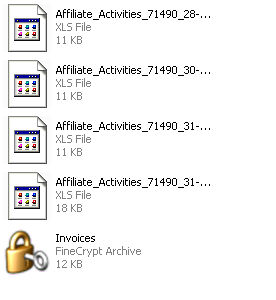
                      

4. It would be advisable to safely erase the original files: Highlight all files, right-click on them and select Fine Crypt/Wipe. After you have confirmed with Yes those files do not exist anymore, thanks to a secure deletion algorithm. You can easily open those files simply by double-clicking on the archive and entering the accurate password.


You will find this security tool not only very important but also user-friendly - it is absolutely vital for both private and business user to ensure highest safety precautions and Fine Crypt does an amazing job helping you to achieve this goal!

< Previous Page

Back to Vista Transformation

Next Page >