


Quick overview:
If you have often experienced inexplicable crashes with the Explorer or many programs and windows open at the same time, this may be due to the memory management behavior of Windows, as it is designed to store as much information as possible in a single window. Block of the Working memory to be written. As this causes fragmentation of this memory and therefore instability, you should run each window and each program in its own memory area.
Windows XP - Stabilize and optimize Explorer
However, on computers below the magical 256MB limit, this reduces the speed of the computing power. And this is how you proceed:
1. Make sure that under Start > System control > System > Extended > Settings > Extended the option Processor scheduling as shown in the picture on Programs is set.
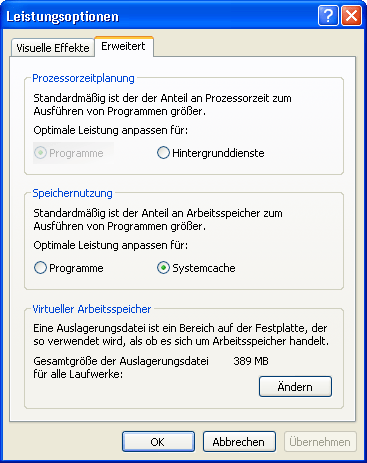
2. After you have confirmed any changes with OK, open any Explorer window, e.g. My Computer.
3. Now click at the top of the bar on Extras > Folder options and switch to the tab View.
4. Use the scroll bar to scroll down until the entry Start folder window in a separate process becomes visible.

5. Click on the small box to tick it. A final confirmation with the OK button confirms the changes.
Important note: If you use the tip together with Memory optimization for Windows XP and encounter problems, you will find help here: Problems with Windows tweaks Performance focus tip! ATI Radeon owners are affected here. We are giving you this notice because some (but very few) users have had problems logging in.

On Windows Tweaks you will find time-saving tech guides for PC, software & Microsoft. For a stress-free digital everyday life. Already We have been tweaking Windows since 1998 and just don't stop!

 Deutsch
 English