


Quick overview:
The MMC (short for Management Console) is an administration interface for NT-based operating systems, including Windows 2000 and XP Professional. Various management tasks (defragmentation, group policies) or PC utilities are carried out in this console. You can access this console, for example, by selecting Start/Execute click and gpedit.msc type in.
However, there are now very frequent cases in which users can no longer access this console due to damage or missing rights (despite being logged on as administrator). Windows-Tweaks offers you the following solutions, which have already been successful in practice:
Reinstallation of the Management Console
1. From some versions of the Desktop Sidebar (www.desktopsidebar.com) is known to be the cause of this error. So try to install the latest version of the sidebar as a test and then remove it again (via the control panel) if you do not want to use it.
2. Click on Start/Execute and type msconfig in. Now click on Extend file and type under "File to be restored" the name "compmgmt.msc" in. Under "Restore from" enter "F:\i386 \compmgmt.ms_" (or with the correct drive letter for the inserted Windows XP CD)!
The target directory is "C:\Windows\System32\compmgmt.msc"! (or your Windows XP system drive)
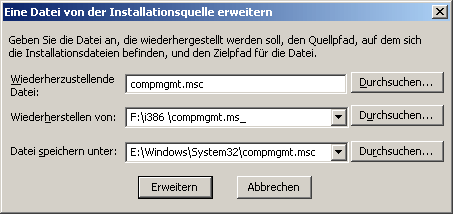
After a short moment, the Management Console is completely reinstalled.
3. If this does not work either, you can reintegrate the corresponding DLL files into the system. To do this, click on Start/Run and enter the following commands followed by Enter.
regsvr32 c:\windows\system32\msxml.dll
regsvr32 c:\windows\system32\msxml2.dll
regsvr32 c:\windows\system32\msxml2r.dll
regsvr32 c:\windows\system32\msxml3.dll
regsvr32 c:\windows\system32\msxml3a.dll
regsvr32 c:\windows\system32\msxml3r.dll
regsvr32 c:\windows\system32\msxmlr.dll
Many thanks for this last tip to Mirko W.!
4. Only for owners of Acer TV cards: If you have such a card in your PC, it is advisable to install the latest drivers.
I hope that I have been able to help you with these instructions.
NOTE FOR NEW PUBLICATION: This article was produced by Sandro Villinger and comes from the Windows Tweaks archive, which has been built up since the late 1990s.

On Windows Tweaks you will find time-saving tech guides for PC, software & Microsoft. For a stress-free digital everyday life. Already We have been tweaking Windows since 1998 and just don't stop!

 Deutsch
 English