


Quick overview:
Updates, hotfixes and the current Service Pack 3 create a backup of the affected system files that are updated before they are installed, so that the newly installed update can be easily removed again in the event of problems. However, if you are satisfied with SP1 or the many hotfixes that solve individual problems, you can free up hundreds of megabytes by deleting the backups. These are located directly in the Windows directory and usually look like this:
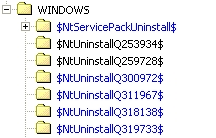
To remove these folders, you must click on Workplace and open the hard disk on which your Windows is installed. Now double-click on the Windows directory, e.g. Windows or WINNT and remove all files that are similar to those shown above.
If, after some time, you are sure that you want to keep installed service packs and hotfixes, you can delete all of these directories. De-installation is no longer possible after this.
For the sake of order, you should then also remove the entries from "System control/ Software" by pretending that you want to uninstall the fixes after deleting the directories. An error message appears stating that the program has already been uninstalled. Confirm the question as to whether you want to remove the entry from the list with "Yes".
NOTE FOR NEW PUBLICATION: This article was produced by Sandro Villinger and comes from the Windows Tweaks archive, which has been built up since the late 1990s.

On Windows Tweaks you will find time-saving tech guides for PC, software & Microsoft. For a stress-free digital everyday life. Already We have been tweaking Windows since 1998 and just don't stop!

 Deutsch
 English