


Quick overview:
PC magazines, websites and books have been publishing tuning tips for Microsoft's operating systems for several years. However, not all of the information is true or only works with previous versions: Here we have caught a particularly big fish in the net! It concerns the automatic unloading of DLL files from the working memory.
It should supposedly be possible by creating the value AlwaysUnloadDLL in the Registration Windows can be instructed to unload unused DLL files from memory for longer, which of course results in performance advantages. The problem is that this trick only works with Windows NT 4.0 and its predecessors! Windows 2000 and XP have improved memory management, which makes this measure unnecessary - the operating systems do not accept this value. Here are the alleged steps to increase performance through DLL unloading:
1. Click on Start/Execute and type regedit in.
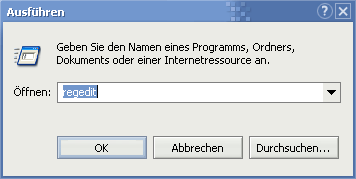
2. Navigate to the key HKEY_LOCAL_MACHINE\SOFTWARE\Microsoft\ Windows\CurrentVersion\Explorer and click with the right mouse button in the right pane and select New/string. Now name these AlwaysUnloadDLL and close the editor.
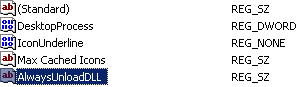
3. After a restart, the setting is applied and you will not experience any improvement in speed.
I admit it now: I've had this tip in the system tuning section online since almost the beginning of Windows tweaks. Having read it in books, dozens of websites and magazines, I was convinced of its value. Even though I never experienced a performance advantage, I left the tip in anyway, as perhaps other users would benefit from the DLL unloading. But now, by chance, I came across the TechNet pages of Microsoft one article who is responsible for the functioning of AlwaysUnloadDLL denied. I promise you that such unprofessional behavior by Windows tweaks will no longer occur and that in future you will only read tips & tricks here that have been properly researched. My guess is that this tip was simply copied and pasted from a faulty source.
Our partners from PC Experience have, according to my information in this regard (in the forum), also found your professional Part for detection and would like to take this opportunity to thank you very much!

On Windows Tweaks you will find time-saving tech guides for PC, software & Microsoft. For a stress-free digital everyday life. Already We have been tweaking Windows since 1998 and just don't stop!
