


Quick overview:
Nowadays, almost everything is "pimped": Rides (cars), bikes (bicycles), sneakers (shoes) ... and much more. Figuratively speaking, "to pimp" means to tune, pimp, improve. True connoisseurs of the English language know more, of course... In any case, "pimping" is incredibly "in" - and we don't want to escape this trend:
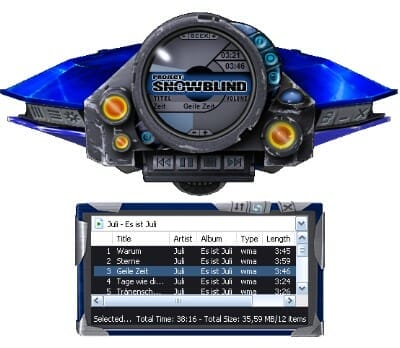
Eidos Software, the game maker of hits Tomb Raider, Deus Ex, Hitman and Co. have created a new epic based on their brand new Project: Snowblind has developed a very stylish skin for Microsoft's Windows Media Player 9 and 10. We will show you how to integrate it into your player step by step:
1. Visit the page www.projectsnowblind.de and click on Windows Media Player Skin. A new window will then open.
2. Now scroll to Project: Snowblind WMP Skin and click on the download link on the right-hand side of the section: Project_...zip. The download of the 7.3 MB file starts immediately.
3. Now unpack the ZIP file with a right-click (Extract all) or with an external decompression tool (such as WinAce).
4. Just double-click on the file and the Windows Media Player is immediately converted to the new design. Give yourself a few seconds to get to know the new interface and its buttons - with a little practice you will be able to navigate through your multimedia files quickly and efficiently.
5. To exit the skin, right-click on the Media Player and click on Switch to full mode. In future, you can access the skin by right-clicking on the Media Player again and selecting View/Design selection or Design mode.
Windows-Tweaks wishes you lots of fun with the brand new Media Player skin!

On Windows Tweaks you will find time-saving tech guides for PC, software & Microsoft. For a stress-free digital everyday life. Already We have been tweaking Windows since 1998 and just don't stop!
