


Quick overview:
The famous Microsoft browser is constantly crashing, error messages are constantly appearing and certain features no longer work. If you have Internet Explorer 6.0 for Windows XP, you are unfortunately very often faced with a multitude of problems which you would certainly solve as a Windows 9x/Me/2000 user by reinstalling Internet Explorer 6.0.
Unfortunately, it is not possible to reinstall the browser as it is permanently integrated in Windows XP and the IE 6.0 setup cannot be persuaded to cooperate. I have found out a secret trick for you, with which it is possible to completely reinstall the well-known surfing program without any effort:
Reinstalling Internet Explorer - here's how
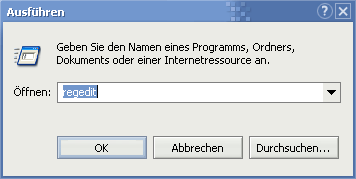
1. In the Start menu, click on Execute and enter in the command line regedit in. The Windows registration editor will appear shortly afterwards.
2. Make your way through the keys HKEY_LOCAL_MACHINE\SOFTWARE\ Microsoft\Active Setup\Installed Components\{89820200-ECBD-11cf-8B85-00AA005B4383} and double-click on the value in the right-hand pane IsInstalled.
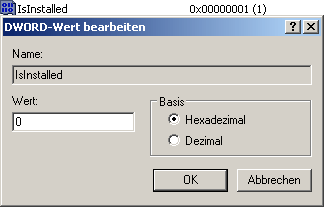
3. Enter here instead of the 1 one 0 on. It is now possible to reinstall Internet Explorer 6.0 without any problems - however, you must first download the complete package for Windows 2000/XP. This tip will show you how to do this here.
NOTE FOR NEW PUBLICATION: This article was produced by Sandro Villinger and comes from the Windows Tweaks archive, which has been built up since the late 1990s.

On Windows Tweaks you will find time-saving tech guides for PC, software & Microsoft. For a stress-free digital everyday life. Already We have been tweaking Windows since 1998 and just don't stop!


 Deutsch
 English