


Quick overview:
If you right-click on a free area of the desktop and select Properties, a window appears in which you will find all the options relating to the display, from the screen saver and background to the choice of resolution. In the following you will find several tricks with which you can lock parts of it or everything completely.
The following screenshot impressively demonstrates how much power these settings have. However, you can reset them again without any problems.
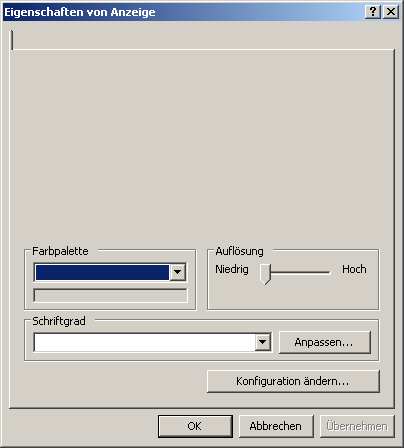
To block certain parts or everything, proceed as follows:
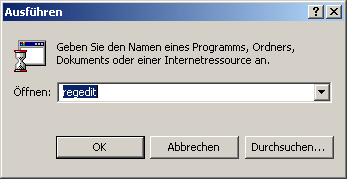
1. Click one after the other on Start > Execute and type in the command line regedit in. A program will then appear with which you can edit the Windows registry database.
2. Go to the key HKEY_CURRENT_USER\Software\ Microsoft\Windows\ CurrentVersion\Policies\System and click with the right mouse button in the right half of the window. From the menu that pops up, select New > DWORD value.
3. A new value appears immediately, which you can give one of the following names to lock the desired option.
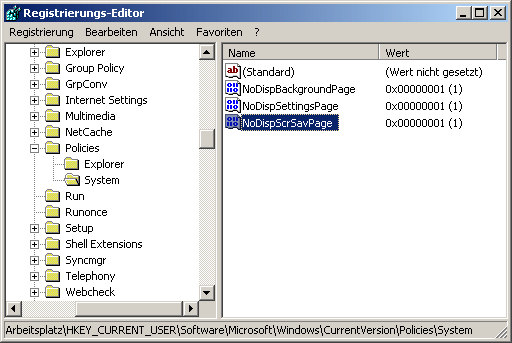
- NoDispAppearancePage
Prevents you from changing the Display option. This means that you can no longer change the appearance of Windows. Double-click on the value after you have created it and enter a 1.
- NoDispBackgroundPage
As soon as you have created this value and changed it to 1, you are denied access to the Background tab. This means that you can neither set a bitmap nor a pattern as the background.
- NoDispScrSavPage
If you set the value to 1, the screen saver option disappears.
- NoDispSettingsPage
Prevents the resolution and color depth from being changed using the Settings tab. Of course, this only becomes effective after you have set the value to 1. As with any value, you can undo this by simply deleting the value or entering a 0 instead of the 1.
- NoDispCPL
Prevents access not only partially but completely after the value has been set to 1. Now you can no longer access the display via the control panel or the desktop. Instead, the following message appears:
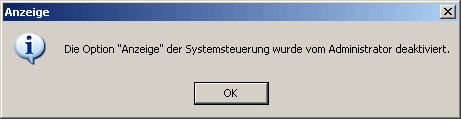
As described above, you can delete all the values you have created or set them to 0 to restore the original settings.
NOTE FOR NEW PUBLICATION: This article was produced by Sandro Villinger and comes from the Windows Tweaks archive, which has been built up since the late 1990s.

On Windows Tweaks you will find time-saving tech guides for PC, software & Microsoft. For a stress-free digital everyday life. Already We have been tweaking Windows since 1998 and just don't stop!
