


Quick overview:
Sending the latest news, messages and e-mails, downloading programs, enjoying films and music - the global Internet data network offers you all this and much more. Many users still shy away from setting up their own Internet connection. Windows Tweaks shows how to set up a normal connection via modem and analog telephone line. First we start with the modem installation:
Modem installation under Windows 2000
1. Click with the right mouse button on Workplace and from the context menu that appears, select Characteristicsn.
2. Now call up the Hardware and click on the button Device Manager.... A new window will open and you will see all your computer components neatly listed. All entries marked with an exclamation mark could not be recognized by Windows 2000 and you will have to proceed with the installation manually. More on this later!
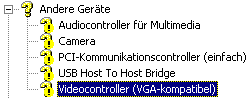
3. Now select the entry that has something to do with your modem, the Internet or communication. Double-click on it and select in the following window Reinstall driver.
4. The assistant welcomes you, which you can do with Next and in the next window click on Next after you have made sure that Search for a suitable driver for the device is marked.
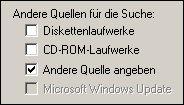
5. In the following dialog, remove the checkmark in front of Diskette and CD ROM drive and select Specify other source.
6. Now select the button Browse and insert the installation CD-ROM or floppy disk into the drive and navigate to it using the Windows Explorer that appears. There you will find a so-called INF file which you must double-click on. It contains the driver information!
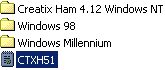
7. Snap on OK and then, after the driver has been recognized, click on Next. Ignore a message regarding driver signing with Yes and wait until everything has been installed correctly. Click on Finish ends your configuration.
Further articles on modem equipment:
- Important information for ISDN system owners
- Increase the dial-up speed of your modem
Now all you need to do is dial up to the Internet. And this is how you proceed: You'll soon be online - dialing into the Internet
NOTE FOR NEW PUBLICATION: This article was produced by Sandro Villinger and comes from the Windows Tweaks archive, which has been built up since the late 1990s.

On Windows Tweaks you will find time-saving tech guides for PC, software & Microsoft. For a stress-free digital everyday life. Already We have been tweaking Windows since 1998 and just don't stop!

 Deutsch
 English