


Quick overview:
In Windows 98 there is a bug that strangely and inexplicably opens the menu New which appears when you right-click on a free area in Explorer or on the desktop.
This is how they restore it:
Edit entries in the context menu
1. Open the Registry Editor by clicking in the Start menu on Execute click and there regedit enter.
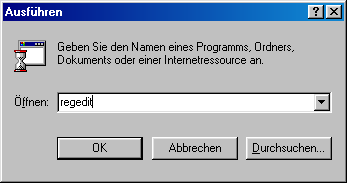
2. After the obligatory confirmation with OK click through the keys HKEY_CLASSES_ROOT\Directory.
3. In the right-hand pane you will now see the entry Standard on which you double-click and {D969A300-E7FF-11D0-A93B-00A0C90F2719} enter.
NOTE FOR NEW PUBLICATION: This article was produced by Sandro Villinger and comes from the Windows Tweaks archive, which has been built up since the late 1990s.
Founded Windows Tweaks as a teenager in 2001 and still runs the site as editor-in-chief. His helpful PC tricks made it Germany's most visited Windows site (at the time Sandro looked like this). He then went on to write for international publications such as PC-Praxis, Computerbild, PCWorld in the USA, IMTEST.de and Hifi.de. Sandro's main job is as Global Product Marketing Lead and Consultant for various global tech companies, including Microsoft, AVG, Avast, Nero, TeamViewer, Swiss IT Security Group and now currently in the fintech sector for Gendigital. But he can't get rid of his passion and shares his tweaks here again. Privately, he enjoys traveling the world and loves Asia, especially Japan, Singapore and Korea, but also natural places like Iceland and the Nordics. You can reach Sandro via e-mail.

Hello & welcome 👋
On Windows Tweaks you will find time-saving tech guides for PC, software & Microsoft. For a stress-free digital everyday life. Already We have been tweaking Windows since 1998 and just don't stop!
On Windows Tweaks you will find time-saving tech guides for PC, software & Microsoft. For a stress-free digital everyday life. Already We have been tweaking Windows since 1998 and just don't stop!
New Windows Guides

 Deutsch
 English