


Quick overview:
Die Auslagerungsdatei ist der sogenannte Virtuelle Arbeitsspeicher von Windows XP, für den Fall, dass der Arbeitsspeicher knapp wird. Wenn aber ein Programm abstürzt bleiben Überreste in der Auslagerungsdatei. Dadurch fragmentiert diese Datei und der Zugriff darauf wird langsamer. Sie können aber veranlassen, dass Windows bei jedem Shutdown die sogenannte Pagefile mit Nullen den bisherigen Inhalt überschreibt.
1. Click on Start > Run and type regedit in the command line. Navigation is similar to Windows Explorer. Go to the following values in sequence HKEY_LOCAL_MACHINE\System\CurrentControlSet\Control\Session Manager\Memory Management.
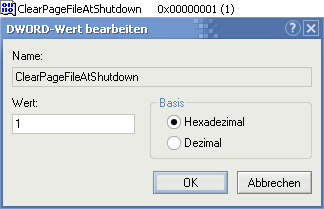
2. You will now see various lines in the right-hand pane. Double-click on the value ClearPageFileAtShutDown and enter a 1 (without quotation marks).
Hinweis: Die Windows-Auslagerungsdatei sollte einen festen (großräumigen) und durchgehenden Platz auf der Festplatte benötigen. Es ist daher zu zu empfehlen die Auslagerungsdatei komplett auszuschalten (den Weg dazu finden Sie hier, Sie müssen lediglich Keine Auslagerungsdatei anwählen). Defragmentieren Sie nun Ihre Festplatte z.B. mit O&O Defrag V6, damit eine grundlegende Ordnung und Struktur in Ihr Dateisystem Einzug hält. Aktivieren Sie nun, wie in oben genannter Anleitung, die Auslagerungsdatei wieder und stellen Sie diese auf den gewünschten Wert. Die Auslagerungsdatei wird an einem Stück ans Ende Ihres Dateisystems verschoben - die Defragmentierung der Auslagerungsdatei (auch PageFile geschimpft) ist nun Vollbracht. Der Weg des Schreib-/Lesekopfes der Festplatte ist möglichst gering und eine leicht spürbare Leistungssteigerung wartet auf Sie.

On Windows Tweaks you will find time-saving tech guides for PC, software & Microsoft. For a stress-free digital everyday life. Already We have been tweaking Windows since 1998 and just don't stop!
