


Quick overview:
The installation and uninstallation of programs, demos and games causes real chaos in the Windows registrationIt swells to a considerable size and is divided into fragments by the resulting gaps. This means that Windows has to load this overcrowded registry into the working memory every time the system is started, which costs time and resources. Access to it is also extremely slow due to the gaps, which not only reduces speed but also leads to instability.
Optimize and reduce the size of the registry
DOS offers the possibility to minimize the registry and delete these gaps so that access is faster and resources are conserved:
1. While Windows is running, click on Start > Exit > Shutdown. You are now in MS-DOS.
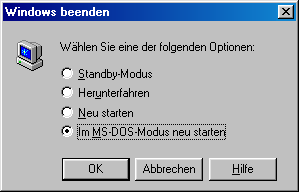
2. Now type the command scanreg /fix in. Confirming with Enter causes this command to be executed, which repairs the registry and deletes free gaps.
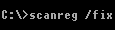
3. Immediately afterwards, write the command scanreg /optwhich reduces and defragments the Windows registry. Immediately after executing this command, the core of Windows is fully operational again and your system is faster than ever.
Windows version with top-class registry optimization
If you want to bypass these steps via the well-known DOS in the future, you can also make do with a Windows version of this tweak, which either repairs or optimizes the Windows registry with a double-click. Proceed as follows:
1. Right-click on the desktop and select New/Link.
2. Now enter the following in the field that appears C:\WINDOWS\SCANREGW.EXE /FIX and confirm with Enter.
3. Now give this link a meaningful name such as Repair registration and confirm with OK. You can also use this step for the C:\WINDOWS\SCANREGW.EXE /OPT so that optimum defragmentation is always guaranteed.
NOTE FOR NEW PUBLICATION: This article was produced by Sandro Villinger and comes from the Windows Tweaks archive, which has been built up since the late 1990s.

On Windows Tweaks you will find time-saving tech guides for PC, software & Microsoft. For a stress-free digital everyday life. Already We have been tweaking Windows since 1998 and just don't stop!
