


Quick overview:
The new DSL (Digital Subscriber Line) enables lightning-fast data transmission on the Internet. Nothing stands in the way of live transmissions, large downloads and extensive music - it offers up to many times the speed of other Internet connections. The lightning-fast construction of Internet pages makes it possible to find information quickly. If you have a DSL connection with a modem, you can easily set it up under Windows Millennium.
Robert Schlabbach has written special drivers for this purpose, which usually work faster and without problems than the device drivers from Telekom or other DSL providers. Unfortunately, the installation is somewhat more complicated than is the case with the simple installation programs, e.g. for T-DSL. We will guide you step by step through the simple installation process:
1. Click hereto download the RasPPPoE drivers from Robert Schlabbach's website. These are usually in compressed form, which is why I recommend WinAce, which easily extracts all types of compressed files. Here to find out how to access WinAce.
2. In the start menu, you must now select the entry Settings and immediately afterwards System control select. Now double-click on the icon Network.

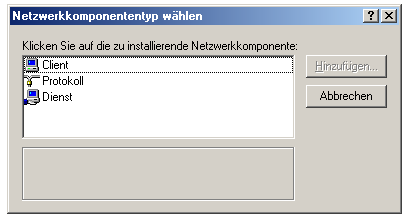
3. A new window opens in which you can click on Add and immediately afterwards double click on Protocol snap.
4. Once you have done this, leave the list of logs that appears behind you and directly select Data carrier.
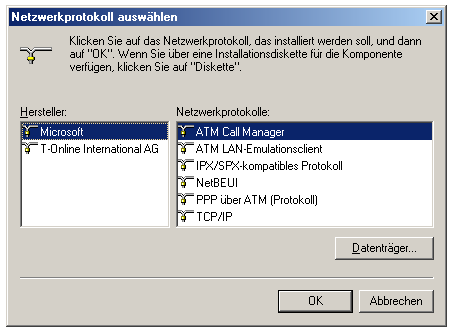
5. In the window that appears, click on Browse and navigate directly to the folder on your hard disk where the RasPPPoE drivers are located. There you will find three INF files - it does not matter which one you choose. Decide for example for netpppoe.inf.
6. The name of the driver now appears in the list, which you can select with Next confirm. Windows will ask you to restart and once you have done this you can get down to business: The first dial-in with Windows Me!
NOTE FOR NEW PUBLICATION: This article was produced by Sandro Villinger and comes from the Windows tweaks archive, which has been built up since the late 1990s.

On Windows Tweaks you will find time-saving tech guides for PC, software & Microsoft. For a stress-free digital everyday life. Already We have been tweaking Windows since 1998 and just don't stop!

 Deutsch
 English