


Quick overview:
You will receive a blue screen with the error code OE: 0187: BFF8E64B (or similar)? When it occurs is random and not linked to any particular action in Word 2000. You have to start up and shut down the system several times to get your Windows to shut down properly. We have the following solution ready for you to get your Windows working again:
1. Norton AntiVirus is the first source of error that you must rule out, as the message occurs much more frequently when it is used. Uninstall the current Norton AntiVirus via the System control under Software. If this option fails, you can use this tool the popular virus software - but the first option is more efficient as it removes more registry and system file entries.
2. If this has not helped or the error still occurs, albeit less frequently, you can easily and quickly get rid of the blue screen in 20 seconds: Click on Start/Search/Search for files or folders... and type in the search term normal.dot in. You can now name all results e.g. in OldNormal1.dot or OldNormal2.dot um.
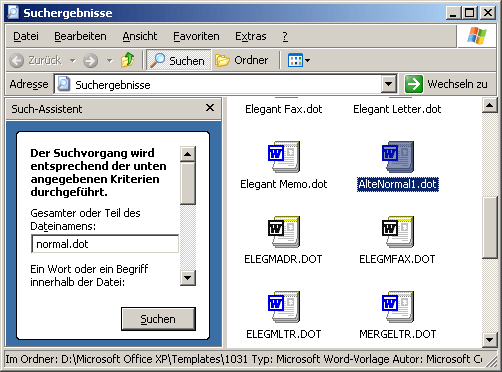
After restarting Word, the blue screen should no longer appear. In some cases, the Word 2000 Normal.dot template file is defective, which is why renaming it can help.
NOTE FOR NEW PUBLICATION: This article was produced by Sandro Villinger and comes from the Windows tweaks archive, which has been built up since the late 1990s.

On Windows Tweaks you will find time-saving tech guides for PC, software & Microsoft. For a stress-free digital everyday life. Already We have been tweaking Windows since 1998 and just don't stop!

 Deutsch
 English