


Quick overview:
It makes no difference whether you are using a brand new computer or an old box: Windows is bound to crash at some point for every user. When this happens, the only thing left for the helpless user to do is to press the reset button, which inevitably leads to a time-consuming ScanDisk hard disk check at system startup.
In the rarest of cases, you will find really serious disk errors. In this case, ScanDisk can also be deactivated during startup. We will tell you how to do this:
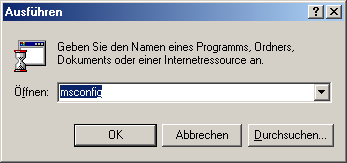
1. Click on Start/Execute and enter the command msconfig to start the system configuration program. Click on OK and the small tool starts immediately.
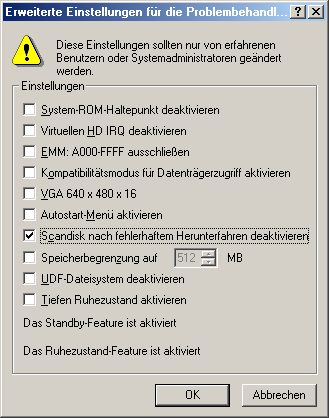
2. Now select Further options and place a check mark in front of Deactivate Scandisk after faulty shutdown. Just restart the program and it will never bother you again.
3. If the above solution has not worked, the only remaining option is to manually access the Windows registration. Then open the Run menu as described above and this time enter regedit.
4. Make your way through the keys HKEY_LOCAL_MACHINE\System\ CurrentControlSet\Control\FileSystem and create in the right pane via the right-click menu New/binary value a new value, which you give the name DisableScanDiskOnBoot give.
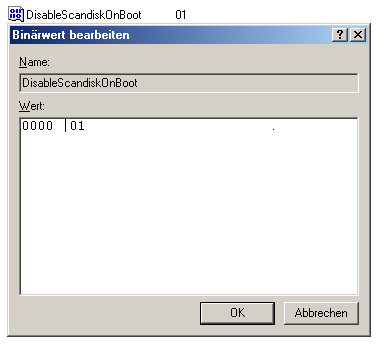
5. Now double-click on it and enter a 1 inside. You can now be sure that Windows no longer requires any checks.
NOTE FOR NEW PUBLICATION: This article was produced by Sandro Villinger and comes from the Windows tweaks archive, which has been built up since the late 1990s.

On Windows Tweaks you will find time-saving tech guides for PC, software & Microsoft. For a stress-free digital everyday life. Already We have been tweaking Windows since 1998 and just don't stop!
