


Quick overview:
Die vielen Vorteile der Sicherheit und Geschwindigkeit bringen auch einen kleinen Nachteil mit sich. Das Lesen und Schreiben von Daten wird durch die Unterstützung für Windows 3.1/DOS Dateinamen, welche lediglich aus 8 Buchstaben bestehen, leicht verlangsamt. Diesen Hemmschuh können sie getrost ausziehen, wenn sie kein solches Betriebssystem nebenher verwenden oder nicht Mitglied eines Netzwerkes mit Windows 3.1/DOS Computern sind.
Und so funktionierts:
(Beachten Sie die Warnung unten, bevor Sie beginnen)
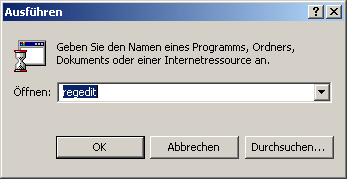
1. Click on Start and select Run. A window will immediately open in whose command line you type regedit and confirm with Ok.
2. The Windows registry opens. Work your way through the following keys step by step: HKEY_LOCAL_MACHINE\SYSTEM\ CurrentControlSet\Control\FileSystem.
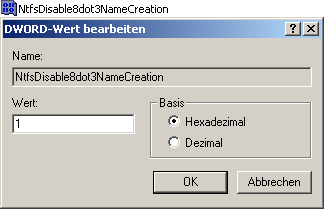
3. Double-click NtfsDisable8Dot3NameCreation in the right-hand pane and enter 1 in the command line that appears.
Now confirm with Ok and restart your computer for the changes to take effect.
Warnung: Wir mussten feststellen, dass sich einige Benutzer über Schwierigkeiten mit DOS Programmen beklagen und folgende Fehlermeldungen zur Folge hatten:
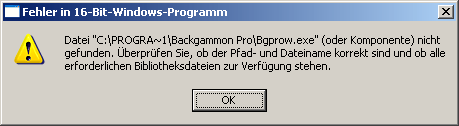
If you still often use very old programs that use the old file notation, we strongly advise against this tweak, as it can no longer be undone.
This error message is particularly serious if you try to install the Via4in1 driver, which takes over the configuration for the hard disk controller and mainboard control. I received interesting information about this topic by e-mail (from Mr. Blei): If you install the corresponding program in a directory that is based on 8+3 (e.g. C:\Prog\VIA\setup.exe), the installation can be carried out smoothly. This was confirmed in a test.
Update problems with Norton AntiVirus 2004 have also been reported occasionally: If NAV is installed with deactivated 8+3 file names (value 1), the setup runs smoothly, whereby the program update (not the virus definition update) is later no longer operational. Even the temporary activation of these file names no longer helps (value 0). The solution is a complete reinstallation with 8+3 file names switched on (restart required). Pay attention to this during installation! Afterwards, it does not matter whether 0 or 1, because the update will then work in both cases.
Vielen Dank für den NAV-Hinweis an Herr Orlowski, der sich die große Mühe machte und dieses Symptom testete und mir per E-Mail die Ergebnisse bereitstellte.
Warnung II: Dank eines Leserbriefs von Herrn Kaltenecker habe ich herausgefunden, dass einige freigegebene Objekten via Netzwerk nach Deaktivierung der 3.1 Dateinamen nicht mehr angezeigt werden. Sollten Sie also Probleme beim Auffinden von Netzwerkordnern und -dateien haben, so empfehlen wir, diese Einstellung nicht zu verwenden.
NOTE FOR NEW PUBLICATION: This article was produced by Sandro Villinger and comes from the Windows Tweaks archive, which has been built up since the late 1990s.

On Windows Tweaks you will find time-saving tech guides for PC, software & Microsoft. For a stress-free digital everyday life. Already We have been tweaking Windows since 1998 and just don't stop!
