


Quick overview:
Since Windows 2000, the so-called Support Tools can be found on the original CD under Support\Tools. This kit contains tools that help, for example, with troubleshooting after failed installations or with diagnosing network connections. The support tools not only give you a better understanding of your Windows environment in the event of a problem, but also provide you with better approaches to solving it. And this is how you install the support tools:
1. Open the \SUPPORT\TOOLS folder on your Windows CD and double-click Setup.exe. Follow the installation wizard until you reach Select An Installation Type.
2. Select Typical, confirm the installation path and click Install Now. A few dozen tools will now be installed, the descriptions of which you can read under Start/(All) Programs/Windows Support Tools/Support Tools Help. Nevertheless, we have picked out the most interesting programs for you:
| Tool name | Designation |
| diruse.exe | Query directory information (size, encryption, etc.) and define your own actions. |
| efsinfo.exe | Lists the encryption status of all files in a directory. |
| filever.exe | Displays version information for a specific file |
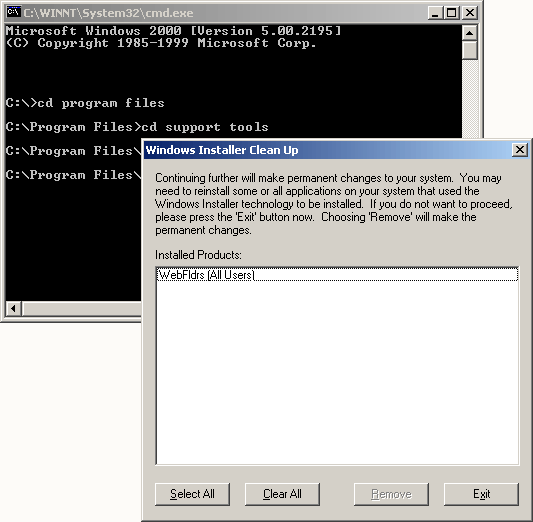
| msicuu.exe | Delete the remaining data from faulty Windows Installer installations. |
| netdiag.exe | Diagnosis of network connections. |
| qfixapp | Apply compatibility patches to older programs. |
| xcacls.exe | Manage NTFS access permissions with this improved version of cacls.exe. |
3. In the same Start menu folder you will also find Command prompt, from where you can call up all tools by typing:
In addition to the support tools, Microsoft also offers the much more comprehensive Resource Kit, which consists of a large collection of tools and a large technical reference. The Resource Kit for Windows Server 2003 is of interest to Windows 2000 users:
1. Download the resource kit from this page and install it.
2. Here, too, we have presented the most important tools, although the true scope is a little larger:
| Tool name | Description |
| autoexnt.exe | Use this to execute a batch file when Windows starts up. |
| chklnks.exe | Checks your hard disk for missing/defective file associations. |
| cmdhere.exe | Integrates a new context menu (right-click) for the Explorer, which allows you to switch to the command prompt of this folder. |
| compress.exe | Compress data that you can later decompress again with expand.exe. |
| delprof.exe | Delete user profiles that are no longer used. |
| diskuse.exe | Shows how much storage space each user requires. |
| list.exe | Edit text documents. |
| logtime.exe | Creates a log of the start and end of a batch file. |
| now.exe | Outputs date/time. |
| ntimer.exe | Indicates how long a program has been running. |
| permcopy.exe | Transfer authorizations from one folder to another. |
| qgrep.exe | Search files for specific content. |
| regini.exe | Edit the registry in a batch file. |
| robocopy.exe | A feature-rich tool for copying files, folders and attributes. |
| showacls.exe | View permissions for files/folders. |
| sleep.exe | Include a waiting time of any length in your batch files. |
| srvany.exe | Run any applications as services. |
| winexit.scr | Screen saver that logs out the current user when inactive. |
3. As with the support tools, you will also find a help file with a detailed description and examples for each tool in the corresponding start menu entry.
We hope that the Support Tools and the Resource Kit have made your life as an administrator a little easier.
NOTE FOR NEW PUBLICATION: This article was produced by Sandro Villinger and comes from the Windows Tweaks archive, which has been built up since the late 1990s.

On Windows Tweaks you will find time-saving tech guides for PC, software & Microsoft. For a stress-free digital everyday life. Already We have been tweaking Windows since 1998 and just don't stop!

 Deutsch
 English