


Quick overview:
This logo also went down in the history of Windows as the splash screen, which can be found in every version of the operating system series. It is a screen with a large Windows logo on it, which appears for a short time when starting up to make the transition between switching on and switching to the Windows level more attractive.
However, it often bothers the user - it also shortens the boot-up time a little, which is why I advise you to switch off this boot screen, as it is also called. Ultimately, it is just an annoying advertisement. Here's how to turn it off:
1. The msdos.sys file must be edited. However, as this is a hidden system file, you must first make it visible. To do this, double-click on Workplace and in the window that appears, select View and below the entry Folder options.
2. Now switch to the tab View and scroll down with the scroll bar until the entry Show all files becomes visible, which you also mark immediately so that a round spot appears in the circle.
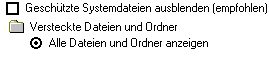
3. After you have closed the window with OK please double click on the drive C:\

4. Now search among the many files for the Msdos.sys and click on it with the right mouse button. In the properties window that appears, remove the tick in front of Read-only and confirm with OK. Now double-click on the file and wait until the list of programs that should open the file appears. Look for the entry Editor and confirm.
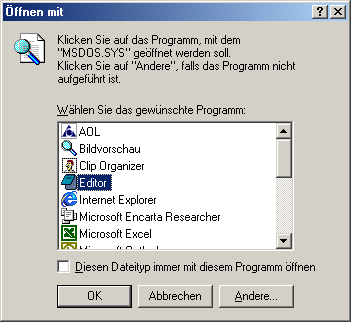
5. Now enter the following in this text file in the section [Options] the line Logo=0 in. 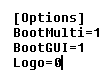
6. Since the file MSDOS.SYS must be exactly 1024 bytes in size, you should now have six X remove. Otherwise, Windows Me may no longer boot up. 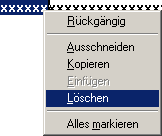
After you have saved the file and restarted your computer, you will notice that the annoying boot logo no longer appears.
NOTE FOR NEW PUBLICATION: This article was produced by Sandro Villinger and comes from the Windows tweaks archive, which has been built up since the late 1990s.

On Windows Tweaks you will find time-saving tech guides for PC, software & Microsoft. For a stress-free digital everyday life. Already We have been tweaking Windows since 1998 and just don't stop!

 Deutsch
 English