


Quick overview:
The long-awaited successor to Windows 98 was on the starting blocks in September 2000 and was intended to complete the long and successful product line of operating systems based on Microsoft Windows 95. However, the merger of Windows 9x and the professional operating system Windows 2000 planned by the Redmond-based software company failed and was only to be successful with Windows XP. The aim was to combine security, speed and stability with home user capabilities and ease of use and installation.
Windows Millennium Edition is clearly aimed at home users, as it is easy to use, has many security measures and makes installing new components child's play for the user. The extensive help function and the detailed explanations of the functions also underline the focus on the home sector.
The differences between Me and its predecessors
In addition to the look, which is based on the modern and serious-looking Windows 2000, some useful new features have been added.
Windows Media Player 7.0
The completely new Windows Media technology has been completely renewed in comparison to its direct predecessor, Media Player 6.4, which was still part of Win98. Click on the headline to view a screenshot gallery with more information. With this program you can easily play and organize all audio files (MP3, WAV, MIDI...) as well as music CDs.
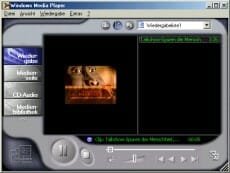
WMP 7.0 can also be used for playing movies or live Internet broadcasts. The management functions should be particularly emphasized here. However, the otherwise quite extensive player spies on the user.
System recovery - security with the new backup system
One of the most innovative and effective new features in Windows Millennium is System Restore. At the user's request, it backs up the complete settings and system files of the operating system and can restore them immediately in the event of an error. This is done by means of so-called restore points which the user can set himself in order to be able to return to this status later.

This tool is particularly popular with users who like to experiment, but cannot keep up with current paid programs, as these back up the entire hard disk and not just settings and system files.
The perfect home video experience with Windows Movie Maker?
As a special treat, Microsoft has also thought of the video freaks among PC users and has thrown its own video editing tool into the program. It reads many file formats, but can only save in the new WMA format, which is why another user must have at least Windows Me to be able to watch them.
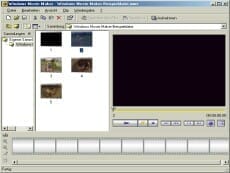
Although the program does not offer many options and cannot compete with professional programs in any way, it does provide an easy introduction to the colorful world of video editing.
How fast Windows Millennium really is - The performance miracle?
The Redmond software company promised during development that the speed would be greatly improved compared to Windows 98. Due to the elimination of the complete DOS (and thus all the associated problems), the new driver architecture and the optimization of the Windows registry, one should be able to see a significant speed advantage. Far from it, because this advantage is immediately offset and defeated by overloaded features such as the complex web view, the logging system recovery, the elaborate media player and many other unnecessary functions. The high memory usage, which has doubled compared to Windows 98 and thus increased from about 30MB to 60MB, also unfortunately has a very negative effect on the speed. Therefore, I can advise against switching to Windows Me on computers with less than 128MB of memory.
Thanks to the slightly improved memory management system, Windows Me runs on computers with 256 MB or more of RAM much faster than Windows 98 does.
The boot process has also been drastically shortened. Thanks to the abandonment of the DOS substructure and the improvement of the registry, Windows Millennium is the fastest starting operating system today. This is an important improvement for many users, as they do not want to wait long for Windows to boot up.
A close look at the stability of Millennium
With its predecessors Windows 95 and 98, Microsoft certainly did not earn any praise when it came to having the most stable and crash-resistant operating system. The frustrated user had to struggle through exception errors and blue screens of death (Bluescreens of Death) until he could continue his work without any problems. Often, driver problems and software errors were the cause. Unfortunately, these unstable programs also always affected Windows, and as a result, they failed, which resulted in a restart and potential data loss.
Windows NT and its successors 2000 and XP are more advanced in this respect. Even a program crash cannot shake you because of the completely changed architecture. A program crashes only in user mode, while the core itself remains untouched and there is the possibility to safely remove the program from memory.
But what about the newest member of the Windows 9x series? Does Windows Me bring the necessary stability to allow it to succeed even in the tough professional world? Only partially!
The new driver architecture and the many new functions make Millennium a more stable operating system than 98. Unfortunately, the overall situation does not look very good for the smart new Windows either. Crashes due to driver problems, the famous screen freezing and blue screens - this is also a sad reality with the new Windows, but this does not mean that Windows crashes permanently. Only if a program becomes unstable does it drag your operating system down with it.
How secure is Windows Me? An insight into the security features
For most users, computer security is still the top priority. They want absolute and permanent protection for their files, programs and settings. Attacks from outside, e.g. by hackers or unauthorized persons, should also be fended off just as successfully as protection against other people tampering with your PC.
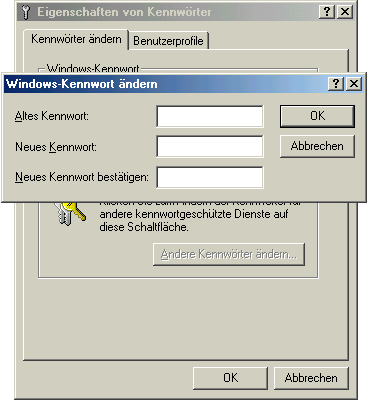
The password properties of Windows Me (as with 9x) are merely useless attempts at obfuscation. Clicking Cancel in this password dialog allows any user to gain full access to the computer. Creating multiple separate user accounts remains reserved for Windows NT systems.
Encrypting files is also a dream that doesn't come true with Me. Anyone who relies on security is completely misguided with Windows Millennium Edition and should familiarize themselves with professional operating systems.
Conclusion: Is Windows Millennium Edition suitable for you?
This question is very easy to answer. If you have your computer at home and you enjoy watching movies, playing computer games, listening to music or browsing the Internet as well as working on common Office applications, Windows ME is highly recommended. The speed and functions are sufficient for this and for most common programs.
Every professional should carefully consider the purchase of ME. The stability and security leave a lot to be desired and the network functions are very limited, which is why Windows 2000/XP would be more suitable here.
If you have decided to install Windows Me, then read here how to install it: Windows Me Installation - A Clear Step-by-Step Guide.
Additional information: The Windows Millennium screenshots collection for first impressions
NOTE FOR NEW PUBLICATION: This article was produced by Sandro Villinger and comes from the Windows tweaks archive, which has been built up since the late 1990s.

On Windows Tweaks you will find time-saving tech guides for PC, software & Microsoft. For a stress-free digital everyday life. Already We have been tweaking Windows since 1998 and just don't stop!

 Deutsch
 English