


Quick overview:
Every time you access information, be it a page or a specific file, certain data is retrieved. This includes the direct address of the respective remote site and its name as well as information about it. This information is stored in a specific part of the Working memory so that they are available again at lightning speed. However, this part is relatively small and therefore a lot of page information has to be retrieved again, which costs time, nerves and, in many cases, money. This can be remedied by increasing the so-called DNS cache in which this information is stored.
Empty Windows DNS cache
1. Click in succession on Start > Execute and type in the command line regedit and confirm with OK. Now the program for editing the Windows registration on.
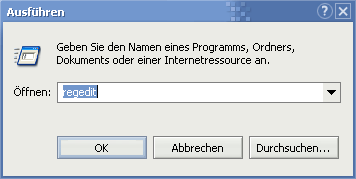
2. Navigate through the keys one after the other as described in the highlighted article HKEY_LOCAL_MACHINE\SYSTEM\CurrentControlSet\ Services\Dnscache\Parameters.
3. Now right-click in the right-hand pane and select New > DWORD Value.
4. A brand new value now appears - you name this self-created entry CacheHashTableBucketSize. Now that you have double-clicked on it and set the value 50 (decimal must be activated, as with all subsequent values), the columns in the DNS info table are expanded. You can now continue directly with the next step.
5. Repeat step 3 and this time state the newly created value CacheHashTableSize. Double-click on this entry and add the number 311 which increase the lines of DNS entries! All prime numbers are permitted, which is why you can also experiment with higher values that you enter on this page find.
6. You must create a new DWORD value for the penultimate time. This time it is called MaxCacheEntryTtlLimit. The obligatory double-click opens the equally familiar dialog window in which you can this time Decimal mark and 172800 which keeps the cache active for 2 days before it is deleted (manual deletion, in case of page load problems: Start/Execute and ipconfig /flushdns type in).
7. And sighing, you set about creating a final value of the DWORD brand and save it as a MaxSOACacheEntryTtlLimit to be entered. Click again on Decimal and the entry 300 end the lengthy procedure by clicking OK. And this is what the entire right-hand pane looks like at the end of the tedious fiddling:
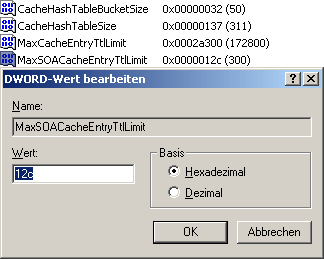
After a restart, the cache has been increased far beyond the known Windows limits.
NOTE FOR NEW PUBLICATION: This article was produced by Sandro Villinger and comes from the Windows Tweaks archive, which has been built up since the late 1990s.

On Windows Tweaks you will find time-saving tech guides for PC, software & Microsoft. For a stress-free digital everyday life. Already We have been tweaking Windows since 1998 and just don't stop!

 Deutsch
 English