


Quick overview:
When connecting to an Internet service provider (or installing a program/tool) while the Windows search function is running, it is quite possible that this search is suddenly no longer operational: A file that is required to run the search assistant was not found. This message is the only feedback you will receive from Windows.
Reinstalling the Windows XP Search Assistant
According to Microsoft, this error only occurs in the English versions of Windows XP, but the following suggested solution has already helped German XP users:
1. Install the Windows XP Service Pack 1 from this page.
2. Manual reinstallation of these files: Open the Run dialog by clicking on Start/Execute click. Enter here %systemroot%\inf in.
3. Look for the file srchasst.inf right-click on it and select Install.
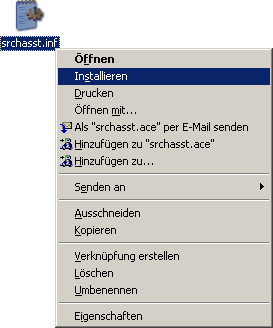
Important: Have the Windows XP installation CD ready! In future, make sure that the search function is not started when you connect to the Internet.
If this suggested solution has not helped, proceed as follows:
1. Open the registry editor (Start/Execute and regedit enter) and navigate to the key HKEY_LOCAL_MACHINE\SOFTWARE\ Microsoft\Windows\CurrentVersion\Explorer\Desktop\NameSpace.
2. Select "NameSpace and click on it with the right mouse button! Now select "New/key and call this
„{e17d4fc0-5564-11d1-83f2-00a0c90dc849} (Without quotation marks).
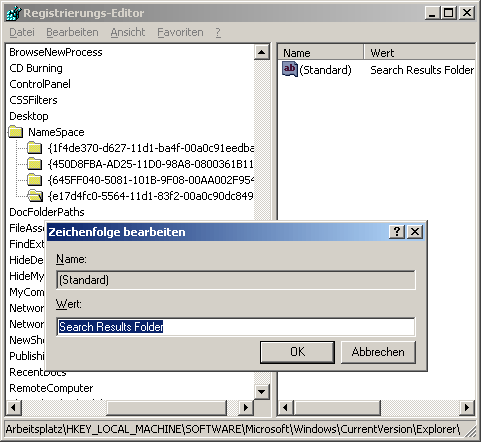
3. In this key, double-click on the value "(Standard) and enter "Search Results Folder in!
After a restart, the search assistant should work properly again!
NOTE FOR NEW PUBLICATION: This article was produced by Sandro Villinger and comes from the Windows Tweaks archive, which has been built up since the late 1990s.

On Windows Tweaks you will find time-saving tech guides for PC, software & Microsoft. For a stress-free digital everyday life. Already We have been tweaking Windows since 1998 and just don't stop!

 Deutsch
 English