


All free, fast iso download links come from secure Microsoft servers. And the instructions from Windows 10 iso expert Sandro Villinger.
Secure Windows 10 ISO download 64-bit Pro and Home (from official Microsoft servers)
Start the fastest direct download of the latest Windows 10 22H2 iso file (for 2025, all editions & all languages such as
Here with us as a FREE instant download:
- For every Windows language like
, and all other languages. - No waiting time or loading errors like on many Microsoft download pages
- No advertising videos or annoying click-throughs like on other platforms
- Directly from secure Microsoft servers
(Link URL: https://go.microsoft.com/fwlink/?LinkId=691209 - directly to the current MediaCreationTool22H2.exe)
It is the simplest method: The tool downloads the current Win 10 22H2 and immediately creates an installation medium via USB stick or DVD.
Good to know:
You can choose between Windows 10 Pro Iso 64-bit, 32-bit and other editions such as Home and language settings in the Iso selection menu after downloading!
Quick overview:
UPDATE: Download Windows 10 22H2 with Media Creation Tool
Hier bei uns funktionieren die Windows 10 Iso-Downloads der aktuellen Version 22H2 weiter kostenlos, schneller & fehlerfrei, siehe Button oben, Links unten oder hier direkt zur MediaCreationTool22H2.exe.
Auf einigen Microsoft-Seiten erhalten einige Nutzer leider häufiger eine Fehlermeldung!
In the next sections you will find further practical tools, download links and methods for downloading and installing the Windows 10 disk image.
Without Media Creation Tool: Windows 10 ISO files Pro and Home (32-bit / 64-bit) in
Die zweite etwas umständlichere Methode:
You absolutely want to download and install the Win 10 disk images (iso files) without the Media Creation Tool?
Dann finden Sie hier auf dieser Microsoft-Seite (etwas unübersichtlich nach einigen Klicks) oder bequemer gleich im nächsten Absatz die direkten Download-Links zu den aktuellen Windows-10-Iso-Dateien 64-Bit / 32-Bit auf English.
Von Microsoft gibt es die ISO-Dateien von Windows 10 zum Download auf English sowohl in der Home als auch Pro-Fassung zum Herunterladen.
Click here to download the 22H2 iso file (
UPDATE, November 2023:
Fortunately, Microsoft has finally made improvements and these Windows 10 Iso download links finally work on the page https://www.microsoft.com/de-de/software-download/windows10ISO
Update im Dezember 2024: Die folgenden Direkt-Links funktionieren nicht mehr - Microsoft blockiert nun den Zugang.
Windows 10 Pro / Home (32-bit / x86) 22H2
Windows 10 Pro / Home (64-bit / x64) 22H2
Read our instructions below
Below you will find step-by-step instructions on how to create a bootable USB stick or DVD for installation using the latest Windows 10 ISO download (64-bit / 32-bit for Pro and Home). With and without license or keys for the Windows 10 operating system.
Runterladen, per Rufus-Freeware daraus ein Installationsmedium USB oder DVD erstellen, Betriebssystem installieren, fertig...
PS: Would you prefer to start a Windows 11 iso download? We will soon provide links and instructions here.
Quick & easy: Download Windows 10 Pro Iso 64-bit via Media Creation Tool

Click on the download button (or URL link) above to start the lightning-fast and very easy creation of the Windows 10 Pro ISO 64-bit file using the Media Creation Tool from Microsoft (the Home Edition and 32-bit version can also be selected).
Runterladen, anklicken und Iso-Variante auswählen - das Tool braucht nicht einmal installiert werden (startet per Klick auf die runtergeladene exe-Datei).
Im Media Creation Tool wählen Sie bequem aus:
- the desired version (Pro, Home, N)
- the architecture (64-bit or 32-bit)
- the Windows language (English, German, French, Spanish, etc.).
Zwar können Sie die jeweiligen Windows 10 Iso Datenträgerabbilder in 64-Bit und 32-Bit mit einem Trick über Umwege auch direkt herunterladen (siehe Download-Links und Anleitung weiter unten) - unsere Empfehlung lautet aber: Nutzen Sie das Media Creation Tool und sparen Sie sich den umständlicheren Weg.
Mit dem Media Creation Tool von Microsoft geht es deutlich schneller und komfortabler - wie die Schritt-für-Schritt-Anleitung im nächsten Abschnitt zeigt.
Ganz wichtig:
Diese ISO-Datei für Win 10 ist nicht Ihr persönliches Windows und enthält auch keine weiteren Programme. Wenn Sie diese zur Neuinstallation verwenden müssen Sie Ihren PC neu einrichten.
How do I create a Windows 10 ISO file 64-bit Pro and Home? This is how it works with the Windows Media Creation Tool!
With this official way from Microsoft, you can quickly download the latest version of Windows 10 as an ISO file and either burn it to DVD or save it on a USB stick.
Wir zeigen, wie's geht:
- Click on the button above or on this link to download the Media Creation Tool directly from Microsoft.
- Start the program and wait a moment. Then continue by clicking on Accept.


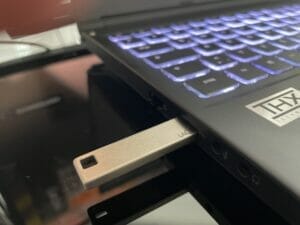
- Now click on Installation media at the top so that the Media Creation Tool downloads the ISO file directly and then immediately copies it to a DVD or USB stick. To do this, plug in a USB stick with at least 8 GB of memory.

- The next step is to decide which version and language you want to download:


In most cases, it is advisable, if you opt for the 64-bit (x64) variant. Only very old PCs with less than 4 GB of RAM should still use the 32-bit variant. - Now you are spoilt for choice: Click on USB memory stick, the plugged-in stick is written to directly and can be used later as an installation stick. If you click on ISO file, the previously loaded ISO version is selected.
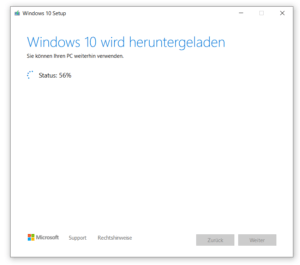

Once the download and copying process is complete, you can plug the USB stick directly into your PC and reinstall Windows. If you have opted for the ISO version, you only need to save it and you can simply burn it in the classic way, provided you have a blank DVD and DVD burner: To do this, right-click on the downloaded file and select Burn disk image:

- You can use both the DVD and the USB stick directly to reinstall Windows 10!
Create a bootable USB stick with the Windows 10 ISO (Pro and Home, 64-bit and 32-bit)
Mit den folgenden 3 Schritten spielen Sie die Window 10 ISO auf einen handelsüblichen USB-Stick auf, der anschließend als bootfähiges Installationsmedium verwendet werden kann (vorher vom USB-Stick alle Dateien sichern bzw. löschen):
- Start the download of Rufus and then the program. In the next step, click on SELECT.
- Now select the freshly downloaded Windows 10 ISO file (usually found in the download folder under a name such as "Win10_21H1_German_x64", see screenshot below)
- You can skip the complicated-looking Rufus default settings: One click on START is enough to create the bootable (also called bootable ) USB stick with your Windows 10 iso.

Freshly reinstall Windows 10 with the finished ISO file
Ganz gleich welchen Weg Sie wählen: Die Installation von Windows 10 von der ISO verläuft ab sofort sehr einfach.
Step 1:
First plug in the USB stick or insert the DVD into the drive. Then restart the PC. Does the Windows 10 installation start automatically? Great! If not, you still need to tell your PC that it wants to select the USB or DVD drive instead of your hard disk when you switch it on. To do this, press the ENTF or F2 key directly when switching on.


Step 2:
Je nach Systemmenü Ihres PCs (auch UEFI/BIOS genannt) kann die Optik und der Ablauf stark abweichen. Es gilt aber stets nach Einträgen a la Boot Priority and Boot Option zu suchen. Dort bestimmen Sie dann, dass der PC zunächst (Priorität 1!) vom USB-Stick starten soll. Im Beispiel oben mussten wir etwa den USB-Stick in der Prioritätenliste ganz nach oben bzw. ganz nach links schieben!

Step 3:
You can now start the Windows 10 installation directly: Click Install now on the welcome screen, accept the license terms and click Next. You can now choose to upgrade (keep files) or custom (reinstall). In the next step, click on your hard disk and start the installation! Done. The rest of the setup process is self-explanatory and you usually only need to confirm with Next before you land on your Windows 10 desktop.
FAQ
Hier die wichtigsten Fragen und Antworten zusammengefasst:
Download links to iso files for Windows 7 and Windows 8
Noch Windows-7-Nutzer? Wir helfen hier gratis und schnell mit dem Windows 7 Recovery CD Download (32-Bit & 64-Bit).
Und bei Microsoft gibt es noch immer eine Seite für den Windows 8 Iso-Download.

On Windows Tweaks you will find time-saving tech guides for PC, software & Microsoft. For a stress-free digital everyday life. Already We have been tweaking Windows since 1998 and just don't stop!

