


Quick overview:
The file "ctfmon.exe is a part of Office XP (or individual components such as Word 2002, Access 2002). Behind this is a program that monitors all open windows and then provides speech recognition, font recognition and other text input devices for them. Unfortunately, this tool (which gnaws at the computer's performance reserves due to its functions) cannot be excluded from the autostart in the conventional way.
In rare cases, problems occur when you try to remove the "tool, but if necessary you can undo the changes. And this is how you switch off the tool:
1. Go to the control panel and open "Software. Now select your Office product and choose "Change. After a short time, a selection appears where you can choose "Next because the required option "Features Add or change... is already marked.
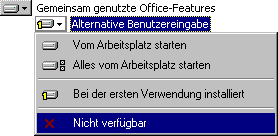
2. Now click once on the "+ before "Shared Office featuresclick with the right mouse button on "Alternative user input and select from the menu that appears "Not available. After clicking on "Refresh the resource waster has disappeared.
Unfortunately, the drivers for the various input devices are still in memory. They can be found in the control panel under "Keyboard and select "HardwareNow delete all drivers except "Standard keyboard 101/102 keys... (Or the specially selected driver).
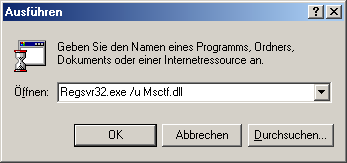
The last step is to remove any DLL files that have been left behind. With "Start > „Execute a command line appears in which you can now enter "Regsvr32.exe /u msimtf.dll and confirm with "Ok. Then open the "Execute Menu this time "Regsvr32.exe /u Msctf.dll in.
Congratulations! You've done it - the tool has completely disappeared.
NOTE FOR NEW PUBLICATION: This article was produced by Sandro Villinger and comes from the Windows tweaks archive, which has been built up since the late 1990s.

On Windows Tweaks you will find time-saving tech guides for PC, software & Microsoft. For a stress-free digital everyday life. Already We have been tweaking Windows since 1998 and just don't stop!

 Deutsch
 English