


Quick overview:
The new DSL (Digital Subscriber Line) enables lightning-fast data transmission on the Internet. Nothing stands in the way of live transmissions, large downloads and extensive music - it offers up to many times the speed of other Internet connections. The lightning-fast construction of Internet pages makes it possible to find information quickly. If you have a DSL connection with a modem, you can easily set it up under Windows 98.
Driver from Robert Schlabbach
Robert Schlabbach has written special drivers for this purpose, which usually work faster and without problems than the device drivers from Telekom or another DSL provider. Unfortunately, the installation is somewhat more complicated than with the simple installation programs, e.g. for T-DSL. We will guide you step by step through the simple installation process:
1. Click here to download the RasPPPoE drivers from Robert Schlabbach's site. These are usually in compressed form, which is why I recommend WinAce, which effortlessly extracts all types of compressed files. Click here to find out how to get WinAce.
2. In the Start menu, select Settings and then Control Panel. Now double-click on the Network icon.

3. A new window opens in which you click on Add and then immediately double-click on Protocol.
4. Once you have done this, leave the list of logs that appears behind you and select Diskette directly.
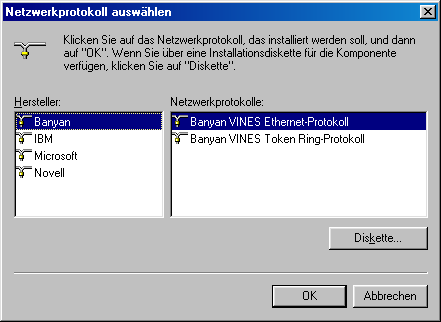
5. In the window that appears, click on Browse and navigate directly to the folder on your hard disk where the RasPPPoE drivers are located. There you will find three INF files - it does not matter which one you choose. For example, opt for netpppoe.inf.
6. The name of the driver now appears in the list, which you confirm with Next. Windows will ask you to restart and once you have done this you can get down to business: The first dial-in with Windows 98!
NOTE FOR NEW PUBLICATION: This article was produced by Sandro Villinger and comes from the Windows Tweaks archive, which has been built up since the late 1990s.

On Windows Tweaks you will find time-saving tech guides for PC, software & Microsoft. For a stress-free digital everyday life. Already We have been tweaking Windows since 1998 and just don't stop!
