


Quick overview:
In many businesses, but also on private computers, it is often important to keep users away from the control panel. Users often click around pointlessly and accidentally break or change something. You should protect the control panel from such access by hiding parts of it or simply everything. Unfortunately, this is not possible without Windows 2000 on-board resources.
This is how they proceed to lock any parts:
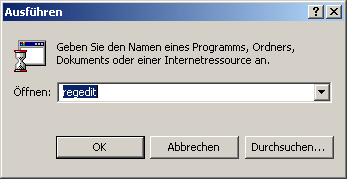
1. Click one after the other on Start > Execute. A command line appears in which you can enter regedit and enter with Ok confirm. In a fraction of a second, the Registration editor through which you can navigate by double-clicking.
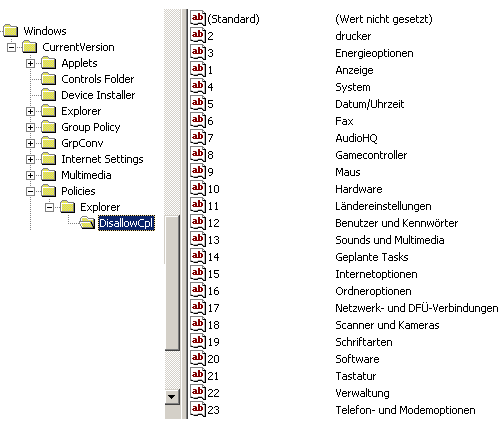
2. Now go through the following keys one after the other HKEY_CURRENT_USER\Software\Microsoft\Windows\CurrentVersion\Policies\Explor er\DisallowCpl. You can now work with the right-hand pane.
3. All options that should NOT be loaded into the control panel are on the right.
4. For example, if you now use the "Display", click with the right mouse button in the right-hand pane and select New > Character string. A nameless value appears, which you can now 1 name. Now double-click on this self-created value and enter "Display" icon. After a restart, the symbol has disappeared.
You must now proceed in the same way as with the display with the other options. Enter the numbers 1, 2, 3 etc. as a character string and give each of these numbers the desired name of the system control option.
You must restart the system for the changes to take effect. If you have now deactivated all the control panel options described above, it will look like this:
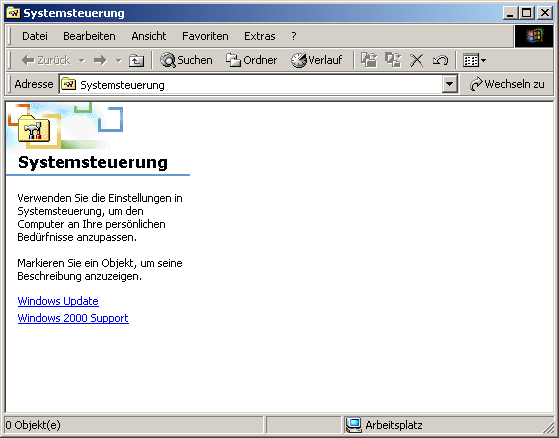
From now on, nobody will be able to tamper with the control panel.
NOTE FOR NEW PUBLICATION: This article was produced by Sandro Villinger and comes from the Windows Tweaks archive, which has been built up since the late 1990s.

On Windows Tweaks you will find time-saving tech guides for PC, software & Microsoft. For a stress-free digital everyday life. Already We have been tweaking Windows since 1998 and just don't stop!
