


Quick overview:
Even in this day and age, DOS can hardly be killed off. Classic games in particular still demand this original operating system. This is not unknown to fellow users in particular, which is why you should give them a break if you want to try out a game or two.
For each tip, there is a single step that you must perform beforehand:
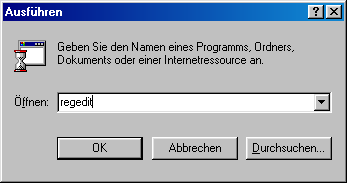
1. Click in succession on Start/Execute and type regedit in. The registry editor appears and you will see a directory structure similar to Explorer.
2. Double-click to navigate through the keys one after the other HKEY_LOCAL_MACHINE\Software\Microsoft\Windows\CurrentVersion\Policies. This last Policies Order should contain the subfolder System which you select.
If this is not available, select Policies and click on it with the right mouse button. Select New/key and baptize it with the name WinOldApp.
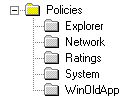
3. Now switch to WinOldAppso that you can see its contents. The right-hand pane now contains all the values described below. Here you can see an example:

Disable the option Start computer in MS DOS mode
If you click on Shutdown in the Start menu, you have the option of closing Windows and switching to classic DOS, which you can disable in the following way:
If you open the right-hand pane of WinOldAppunder the registry path mentioned above, and then click New/DWORD Value a new value appears, which you can set to the name NoRealMode baptize. Now double-click on this value and enter a 1 in the command line. As soon as the value has been created, Windows can no longer be shut down.
Disable the MS DOS command prompt
The execution of DOS programs under Windows can also be conveniently switched off.
Click in the right-hand pane and select New/DWORD Value. You can now call this Disabled and double-click on it. After you have 1 MS DOS is denied them.
NOTE FOR NEW PUBLICATION: This article was produced by Sandro Villinger and comes from the Windows Tweaks archive, which has been built up since the late 1990s.

On Windows Tweaks you will find time-saving tech guides for PC, software & Microsoft. For a stress-free digital everyday life. Already We have been tweaking Windows since 1998 and just don't stop!

 Deutsch
 English