


Quick overview:
Some remnants from the DOS, Windows 3.1 and Windows 95 days can still be found in Windows 98/Me for compatibility reasons. These play an important role in the 16/32-bit hybrids of the 9x series. The msdos.sys in particular still remains after many years - only Windows NT-based systems (2000/XP/2003) are pure 32-bit Windows versions that no longer have anything to do with this Win16 cornerstone.
In 98/Me, MSDOS.SYS is an essential system file and powerful when it comes to controlling the operating system startup process. The most important MSDOS commands, with which you can speed up your startup process and save system resources, can be found here...
Note: Open and edit the msdos.sys with the help of this guide from Windows-Tweaks!
Take a look at the following image section - the various commands in the list below must be entered under [Options]:
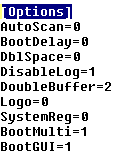
| AutoScan=VALUE | If you enter the number 0 for VALUE, ScanDisk is deactivated in the event of an incorrect shutdown. | 1 |
| BootDelay=VALUE | Some tools/programs set a value higher than 0 here for security reasons and delay the start process unnecessarily. Make sure that 0 is entered as the value! | 0, 1, 2 |
| DblSpace=VALUE | DoubleSpace is a DOS memory compression tool that is no longer used today. Prevent the DS driver from loading with DblSpace=0. | 1 |
| DisableLog=VALUE | A log is created in the Bootlog.txt; prevent the creation with VALUE=1. | 0 |
| DoubleBuffer=VALUE | Larger IDE and SCSI hard disks gain from the double buffer. Speed . 1 ensures automatic detection and activation; 2 forces activation. . 1 ensures automatic detection and activation; 2 forces activation. | 0 |
| Logo=VALUE | Activates (1) or deactivates (0) the boot logo Windows 98/Me is started. | 1 |
| SystemReg=VALUE | Checks the WindowsRegistry on startup if the value has been set to 1. Recommendation: Set this value to 1 every 14 days for a system start and otherwise leave it at 0 so that the registry is not (unnecessarily) checked at every system start. | 1 |
Now save and close the file. The changes will be active the next time you start the system and you may be able to enjoy a faster boot-up process and more free resources!
NOTE FOR NEW PUBLICATION: This article was produced by Sandro Villinger and comes from the Windows tweaks archive, which has been built up since the late 1990s.

On Windows Tweaks you will find time-saving tech guides for PC, software & Microsoft. For a stress-free digital everyday life. Already We have been tweaking Windows since 1998 and just don't stop!
