


Quick overview:
The popular file-sharing program Kazaa has now firmly established itself in the volatile file-sharing industry. Many fans of the program have complained about Microsoft's latest service pack prank, which puts an end to the unlimited download experience, as Kazaa can no longer be made to cooperate or run shortly after its installation.
Win XP SP 1 - Update Kazaa
We have done some work for you and have come up with a rather interesting method of how you can use Kazaa again:
1. Click in succession on Start/Programs/Accessories and select the Program compatibility wizard.
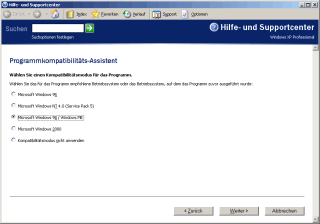
You have to fake a Windows 98/Me for Kazaa to run smoothly
2. Now use the button Browseshortly after you click on Next the program start file (.exe file) from Kazaa, which is located in the Kazaa folder on your hard disk.
3. In the Select a compatibility mode for the program dialog, select Windows 98/Windows Me and confirm this. As all other settings are irrelevant for Kazaa, permanently click on Nextuntil the wizard leaves you alone. However, tell it that you always want to start the application in this mode.
From now on Kazaa should resume its service on your computer and provide you with useful downloads...
NOTE FOR NEW PUBLICATION: This article was produced by Sandro Villinger and comes from the Windows Tweaks archive, which has been built up since the late 1990s.

On Windows Tweaks you will find time-saving tech guides for PC, software & Microsoft. For a stress-free digital everyday life. Already We have been tweaking Windows since 1998 and just don't stop!

 Deutsch
 English