


Quick overview:
You will often find that when you change a desktop icon or refresh the desktop, the icons are displayed incorrectly or not at all. This is related to the icon Cache which contains a total of 500 different symbols for quick access. Unfortunately, there are also damaged symbols or references to symbols that no longer exist. Windows has to load this cache from the hard disk every time. With a small file that automatically edits the Windows registry, it is possible to set up a convenient menu in the folder options of the Explorer.
And this is how you proceed:
1. Click here to download the file to a directory of your choice.

2. Open it and double-click on the file . The message that then appears only needs to be confirmed with Yes and afterwards Ok be confirmed. The changes have already been made. Restart your computer now!
Simply configure the icon cache size
3. After Windows has loaded, open Windows Explorer and select Extras the entry Folder options. Go to the register now View and scroll all the way down using the scroll bar. You will see the following new entries:
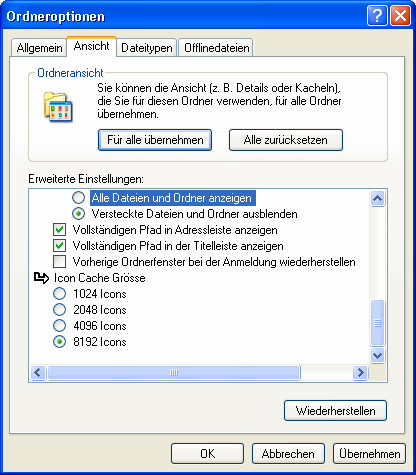
4. In this convenient menu, you can now set how many icons are loaded into the working memory. The more icons, the faster and easier it is to display them. However, if you have little RAM (128MB), the highest setting is not recommended under any circumstances.
NOTE FOR NEW PUBLICATION: This article was produced by Sandro Villinger and comes from the Windows Tweaks archive, which has been built up since the late 1990s.

On Windows Tweaks you will find time-saving tech guides for PC, software & Microsoft. For a stress-free digital everyday life. Already We have been tweaking Windows since 1998 and just don't stop!

 Deutsch
 English