


Quick overview:
You have plenty of RAM installed in your PC with Windows 2000. Now you would like to use part of the memory to store temporary files and set up a ramdisk for this purpose. Under Windows 95/98/ME there is the RAMDRIVE.SYS driver supplied. In Windows 2000/XP, however, you will not find anything similar. You can retrofit a ramdisk under Windows 2000/XP with a free driver from Microsoft. The English-language knowledge base article provides a link to the download address of the driver http://support.microsoft.com/default.aspx?scid=kb;EN-US;q257405 (57 KB). The RAMDISK.EXE file is a self-extracting archive that you decompress by double-clicking in any directory. Now integrate the ramdisk driver into the system as a new device.
1. To do this, click one after the other on Start > Settings > System control > System > Hardware > Hardware assistant. In the window that appears, click on Next.
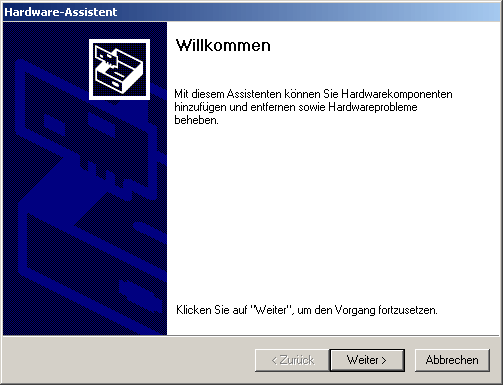
2. Now select Yes, the hardware has already been connected and click on Next. In the following window, scroll all the way down and select Add new hardware followed by Next.
3. Then select the option Select and install hardware manually from a list. Go now Show all devices and again on Next. Now your PC needs some time.
4. Click now on Data carrier and select the path to your ramdisk driver. Double-click on the file. After installation, the ramdisk is immediately available under the drive letter Z:.
However, the default size of the ramdisk after installation is only 1 MB. To change the size, start REGEDIT.EXE via the start menu item Executebecause the configuration is carried out completely via the Registry. All driver parameters can be found in the key
"Hkey_Local_Machine\SystemControlSet001\Services\Ramdisk\Parameters".
The entry "DriveLetter" assigns the specified drive letter to the ramdisk
to, "DiskSize" specifies the size in bytes. Enter the value either as a hex value or as a decimal value.
However, the size of the ramdisk is limited to 1F00000 (hex) which corresponds to a size of around 31 MB. You can reach a 16 MB ramdisk with the
Hex value "1000000", with "800000" it would hold approx. 8 MB. If the size is invalid, the ramdisk refuses to work, but otherwise does not interfere with the system.
A restart is required after every change to a parameter. If you no longer need the ramdisk, you can either set the size to zero in the registry or uninstall the driver using the hardware wizard.
I would like to thank Damian Dandik for this trick. He manages the project www.damian-dandik.de. The site for the network under Win9x/Me and 2000/XP.
NOTE FOR NEW PUBLICATION: This article was produced by Sandro Villinger and comes from the Windows Tweaks archive, which has been built up since the late 1990s.

On Windows Tweaks you will find time-saving tech guides for PC, software & Microsoft. For a stress-free digital everyday life. Already We have been tweaking Windows since 1998 and just don't stop!

 Deutsch
 English