


Quick overview:
Especially in this day and age, computers with more than this amount of memory are no longer a rarity. If you have this much memory in your system, you will have serious problems with Windows Me. You will experience frequent crashes and startup problems. For a detailed description of the problem click here.
To get rid of the problem, you must work through the following instructions carefully:
1. Click on Start and tap under Execute the command System.ini in.
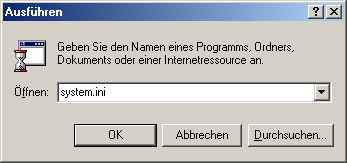
2. Now scroll down with the scroll bar until the entry [VCACHE] becomes visible. Click directly behind it so that the bookmark jumps there and press Enter once. You are now directly below it.

3. Now write the line MaxFileCache=524288 without the quotation marks. Save and close the file. The error is corrected after a restart.

NOTE FOR NEW PUBLICATION: This article was produced by Sandro Villinger and comes from the Windows tweaks archive, which has been built up since the late 1990s.

On Windows Tweaks you will find time-saving tech guides for PC, software & Microsoft. For a stress-free digital everyday life. Already We have been tweaking Windows since 1998 and just don't stop!

 Deutsch
 English