


Quick overview:
The best way to access the standard Windows Explorer is through the Start menu. It offers a variety of options, such as copying, renaming, or moving files. Unfortunately, Explorer always opens the "My Documents" folder. To display a different folder, do the following:
1. Right-click on the shortcut of the Explorer and select Properties.. A new window appears with several setting options. Under Destination you will find the entry C:\Windows\explorer.exe.
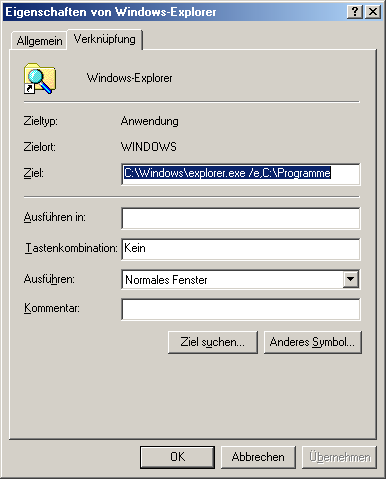
2. Change this line to C:\Windows\explorer.exe /e,C:\Program Files to start the Explorer in the Programs folder in future. You can specify any folder on your hard disk here.
NOTE FOR NEW PUBLICATION: This article was produced by Sandro Villinger and comes from the Windows tweaks archive, which has been built up since the late 1990s.

On Windows Tweaks you will find time-saving tech guides for PC, software & Microsoft. For a stress-free digital everyday life. Already We have been tweaking Windows since 1998 and just don't stop!

 Deutsch
 English