


Quick overview:
The constant opening and closing of applications leaves gaps in the Working memorywhich are associated with the fragmentation of a Hard disk is to be compared. The data in the working memory gets so mixed up that access to it becomes somewhat slower and more sluggish.
You should prevent this annoying fragmentation after a few hours of work by creating the following small script, which you can start immediately by double-clicking. It is a so-called VBS script, which is why you need VBS support, which is already integrated in Internet Explorer 6.0. This script restores the working memory to its former order and defragments it.
1. Right-click on the desktop and select New/text file. You now baptize this with the name Defragmenting the working memorywhere the name does not matter, and open.
2. Now write the simple line "Mystring = (16000000)" if you have more than 128 megabytes of RAM. If you have 128 megabytes or less of RAM, the line for you is Mystring=(8000000).
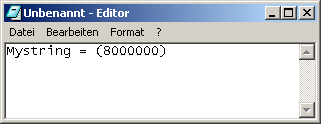
3. Click on File/Save as and select under File type now All files. Now call the script Defragment memory.vbs.
Now it is stored on your desktop and ready for use at any time: Simply double-click! Don't be surprised if your computer (seemingly) does nothing after you double-click. Since memory access times are lightning fast, defragmentation is completed within a second!
NOTE FOR NEW PUBLICATION: This article was produced by Sandro Villinger and comes from the Windows Tweaks archive, which has been built up since the late 1990s.

On Windows Tweaks you will find time-saving tech guides for PC, software & Microsoft. For a stress-free digital everyday life. Already We have been tweaking Windows since 1998 and just don't stop!
