


Quick overview:
Windows 2000 offers a very special feature if the hard disk works in the NTFS file system: The encrypting file system (EFS).With its help, they can optimally protect their data from unauthorized access and make it visible only to themselves. Another user working on your PC cannot access it. If you have installed WinXP on a FAT32 partition, this function is unfortunately not available to you. Unfortunately, you can only encrypt individual files or folders in a very cumbersome way (right-click on the desired file > Properties > Advanced > Encrypt content to protect data > OK > OK).
It would be easier if you could just right-click on a file and select the Encrypt/decrypt option. Here I have the right thing:
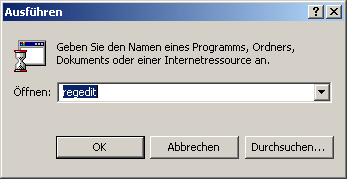
1. Click on StartRun > type in regedit. Now confirm with ENTER. A Windows Registry program appears, which is very similar to Windows Explorer in terms of handling. Here you can navigate through the so-called keys as you would through folders.
2. Go to HKEY_LOCAL_MACHINE\ Software\Microsoft\Windows\ CurrentVersion\Explorer\Advanced and right-click on an empty area in the right-hand pane. Now select New > DWORD value and give it the name EncryptionContextMenu.
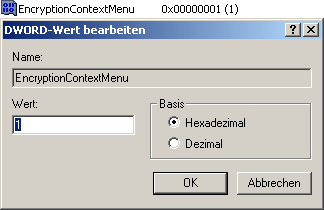
3. Double-click on this newly created value and enter 0 instead of 1.
NOTE FOR NEW PUBLICATION: This article was produced by Sandro Villinger and comes from the Windows Tweaks archive, which has been built up since the late 1990s.

On Windows Tweaks you will find time-saving tech guides for PC, software & Microsoft. For a stress-free digital everyday life. Already We have been tweaking Windows since 1998 and just don't stop!
