


Quick overview:
The way to the start menu is connected with two clicks, which you can save and want to go among the programmers. With the help of a self-created script, it is possible to switch to the familiar shutdown options with a double-click or key combination. Even though we have already given some other tips on the homepage, we have found this new option and would like to share it with you. And this is how you proceed to create your own WSH script:
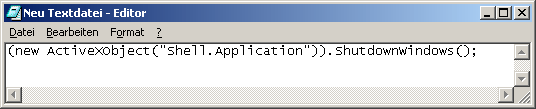
1. Click with the right mouse button on New/text document and enter the following content in this file (new ActiveXObject("Shell.Application")). ShutdownWindows(); in.
2. Click on File/Save as... and switch to File type to All files. Now enter the file name Shutdown.js and confirm.
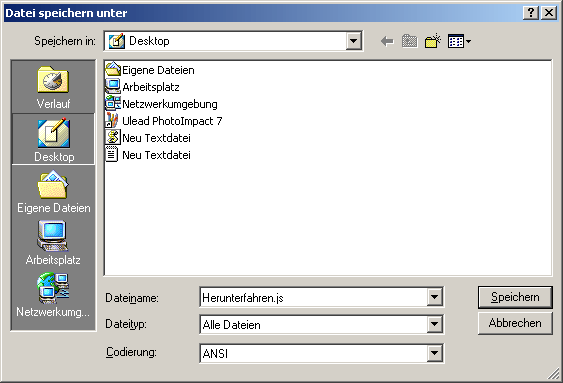
3. Now save this file on the desktop and double-click on it to access the shutdown selection. We hope that we have been able to help you with this tip! If you want to change the icon, move your self-made file to another directory and create a shortcut on the desktop. If you now right-click on it and select Properties, you can select any icon you like. For example, the red shudown icon in the file C:\WINDOWS\system32\SHELL32.dll is perfect!
NOTE FOR NEW PUBLICATION: This article was produced by Sandro Villinger and comes from the Windows Tweaks archive, which has been built up since the late 1990s.

On Windows Tweaks you will find time-saving tech guides for PC, software & Microsoft. For a stress-free digital everyday life. Already We have been tweaking Windows since 1998 and just don't stop!

 Deutsch
 English