


Quick overview:
Microsoft's first 32-bit operating system, which worked with the Windows 95 interface, was Windows NT. Nowadays, anyone booting up a computer equipped with this system will be very surprised at the completely different boot process, which is more reminiscent of a complete crash.
If you would like to remember these times, which are considered the Middle Ages in today's computer world view, you can try the following trick:
1. Open the workstation and click in the bar on Extras > Folder options > View and remove the checkmark in front of Hide protected system files (recommended). Confirm the message with OK.
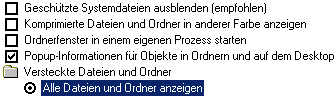
2. Now move the scroll bar further down and activate the option AShow all files and folders. Click on OK. Now double-click on drive C:\ (or on the drive where your Windows is installed) and open the file Boot.ini. Now search for the line (it may differ slightly from this one):

[operating systems]
multi(0)disk(0)rdisk(0)partition(2)\WINNT="Microsoft Windows 2000 Professional" /fastdetect
Carry them behind the /fastdetect the parameter /sos in. Save the file and restart it. Your first restart will already show a completely new side.
The Windows 2000 boot logo has disappeared and, in addition to the exact version number and your RAM size, which you already know, you can see exactly which drivers are loading.
If this is all too fast for you and you are looking for errors, for example, you can make a log of the start:
1. Start up your computer and press shortly before Windows 2000 starts the F8 button.
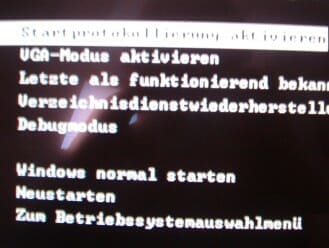
2. Now select Activate start logging. As with the /sos command, detailed information is now spit out, which you can later read in full in the file ntbtlog.txt which is located in the Windows folder.
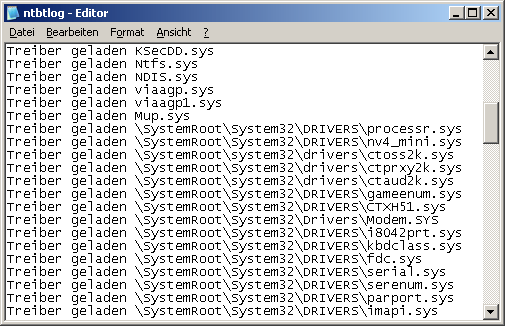
Here you can easily search for errors!
NOTE FOR NEW PUBLICATION: This article was produced by Sandro Villinger and comes from the Windows Tweaks archive, which has been built up since the late 1990s.

On Windows Tweaks you will find time-saving tech guides for PC, software & Microsoft. For a stress-free digital everyday life. Already We have been tweaking Windows since 1998 and just don't stop!
