


Quick overview:
Windows reads files of your Hard disk in advance so that they can be deployed more quickly when they are actually needed. They are then Working memory of the computer because they are much faster than the drives from which they are read. The part that Windows reserves for such files is called the cache - so the cache that stores data in advance is also called the read-ahead cache.
Unfortunately, modern programs need so many files that this nice feature is overwhelmed. But you can increase this cache in the registry.
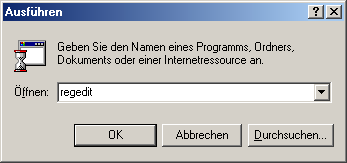
1. Click in succession on Start > Execute and enter the command regedit which will take you directly to the program for editing the Windows registration throws.
2. Go to the key "HKEY_LOCAL_MACHINE\System\ CurrentControlSet\Control". If you now click on "FileSystem" button, you will see several values in the right-hand window. Only the value "ReadAheadThreshold" is important for us. If it is not there, click with the right mouse button on a free area in the pane and select "New" > "Binary value". Now click on this value again with the right mouse button and select "Change". Write now "00,00,20,00" and click on "OK".
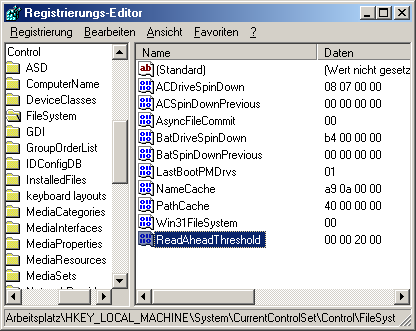
Done! Your Windows now uses exactly 2 megabytes as a read-ahead cache. And the great thing about this is that it does not permanently load the RAM because it then empties this cache. A restart completes this important change to the system.
NOTE FOR NEW PUBLICATION: This article was produced by Sandro Villinger and comes from the Windows tweaks archive, which has been built up since the late 1990s.

On Windows Tweaks you will find time-saving tech guides for PC, software & Microsoft. For a stress-free digital everyday life. Already We have been tweaking Windows since 1998 and just don't stop!
