Windows Tweaks Logo Microsoft PC-Hilfe - 02 blue red
Windows Tweaks Logo Microsoft PC Help - 09 white 120

Windows 2000 - Optimize and refine mouse control

November 27, 2013
Updated: April 14, 2022
Quick overview:

Conventional ball mice are slowly becoming obsolete these days and are being replaced by much better optical colleagues with sensors, which can be controlled much more precisely and finely. But there's a trick you can use to give the old rodents a helping hand.

The sample rate determines how often the mouse should be scanned. If you increase this value, more precise and smoother mouse control is possible, which is almost as good as an optical mouse. Under Windows 98/ME you have to download a special program that determines this PS/2 sample rate. This is no longer necessary under Windows 2000, as the setting is conveniently located in the Device Manager:

1. Click with the right mouse button on Workplace > Properties. Click on the tab Hardware and select the button Device Manager.

2. Double-click one after the other on Mice and other pointing devices and then click on the entry for your mouse. A window appears in which you can click on the Extended click.

3. Now set under Sampling rate the value to 200 and under Input buffer length to 300.
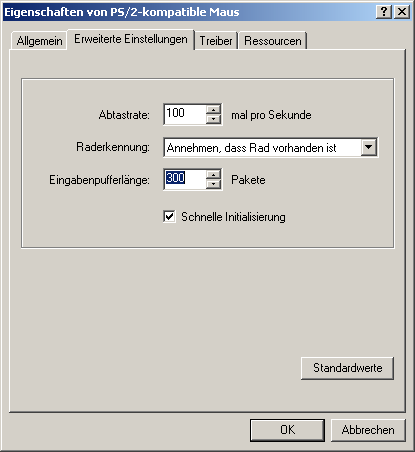
After a restart, you will enjoy more precise and finer mouse control, which will benefit you when playing and working.

NOTE FOR NEW PUBLICATION: This article was produced by Sandro Villinger and comes from the Windows Tweaks archive, which has been built up since the late 1990s.

Founded Windows Tweaks as a teenager in 2001, his helpful PC tricks made it Germany's most visited Windows site (at the time Sandro looked like this). He then went on to write for international publications such as PC-Praxis, Computerbild, PCWorld in the USA, IMTEST.de and Hifi.de. Sandro's main job is as Global Product Marketing Lead and Consultant for various global tech companies, including Microsoft, AVG, Avast, Nero, TeamViewer, Swiss IT Security Group and now currently in the fintech sector for Gendigital. But he can't get rid of his passion and shares his tweaks here again. Privately, he enjoys traveling the world and loves Asia, especially Japan, Singapore and Korea, but also natural places like Iceland and the Nordics. You can reach Sandro via e-mail.

Leave a Reply

Your email address will not be published. Required fields are marked *

Windows Tweaks Logo Microsoft PC Help - 09 white 120
by Real Tech Experts
Save time and stress with expert knowledge about software, hardware, AI & Microsoft. 
Windows Tweaks Microsoft PC Help - SINCE 1998 - retina 2

Time-saving tips for PCs, laptops, Windows & software?

Subscribe to our newsletter and receive only our best guides & tweaks as well as exclusive tips for our subscribers. 
Newsletter-Form
Unsubscribe at any time. Approximately 1 - 2 emails per month. This consent includes information on revocation, shipping service provider, and statistics according to our Privacy Policy.
© 1998 - 2026 Windows-Tweaks.info
Made in Germany with ❤️ 
For all technology users around the globe.
This website runs on 🌳 GREEN energy
crossmenu
